
Introduction
Have you ever wondered how Google can find the right sites in milliseconds? How can a navigation app work out the quickest route to your destination? How can an online store recommend products you might like?
Algorithms power all those everyday experiences.
Algorithms are a key concept in computer science. They're what allow computers to solve problems, process information, make decisions, and do tasks. From basic calculations to AI, algorithms are at the heart of computing.
The good news is you don't need to be a seasoned programmer to understand them. With just a few basic principles, you can start off designing algorithms and building your problem-solving skills.
In this guide, you'll learn what an algorithm is, how it works, the various types of algorithms, and how to solve a programming problem step by step.
What Is an Algorithm?
An algorithm is a well-defined sequence of steps for solving a problem or carrying out a task.
An algorithm takes input, processes it according to a set of instructions, and produces output. The instructions must be unambiguous and must lead to the desired result.
Think of an algorithm as a recipe. When you prepare a meal, you follow a sequence of instructions:
- Gather the ingredients.
- Prepare the ingredients.
- Cook them in the correct order.
- Serve the finished meal.
If you omit a key step or do the steps in the wrong order, the outcome may not be what you expected. A computer algorithm is no different: it's a set of instructions it follows to achieve a particular outcome.
A Simple Everyday Example
Imagine that you want to determine whether you have enough money to buy a product. Your algorithm might be:
- Read the product price.
- Read the amount of money available.
- Compare the two values.
- If the available money is greater than or equal to the price, display “Purchase possible.”
- Otherwise, display “Insufficient funds.”
This is an algorithm because it describes a logical, step-by-step procedure for solving a problem.
An algorithm doesn't have to be in a programming language. It can be in plain English, it can be pseudocode, it can be a flowchart, or it can be actual program code.
Why Are Algorithms Important?
Algorithms are fundamental because computers need instructions to do anything useful. A computer can process vast quantities of data, but it still needs an algorithm to tell it what to do with that data.
Everyday Applications
| Application | Primary Function |
|---|---|
| Search engines | Find and rank relevant information |
| Navigation apps | Calculate routes between locations |
| Online shopping | Recommend products based on user behavior |
| Banking systems | Process transactions and detect suspicious activity |
| Social media | Select and organize feed content |
| Artificial intelligence | Learn patterns and generate predictions |
| Cybersecurity | Encrypt data and detect security threats |
Algorithms also help programmers solve problems consistently. Instead of doing the same thing thousands of times, the computer can run the algorithm.
Another key advantage is efficiency. A good algorithm solves the problem using far less time, memory, and compute than a poor one. This is of course critical when you're dealing with large volumes of data or when you're building an application that is going to be used by millions of people.
How Does an Algorithm Work?
Most algorithms can be understood through three basic components:
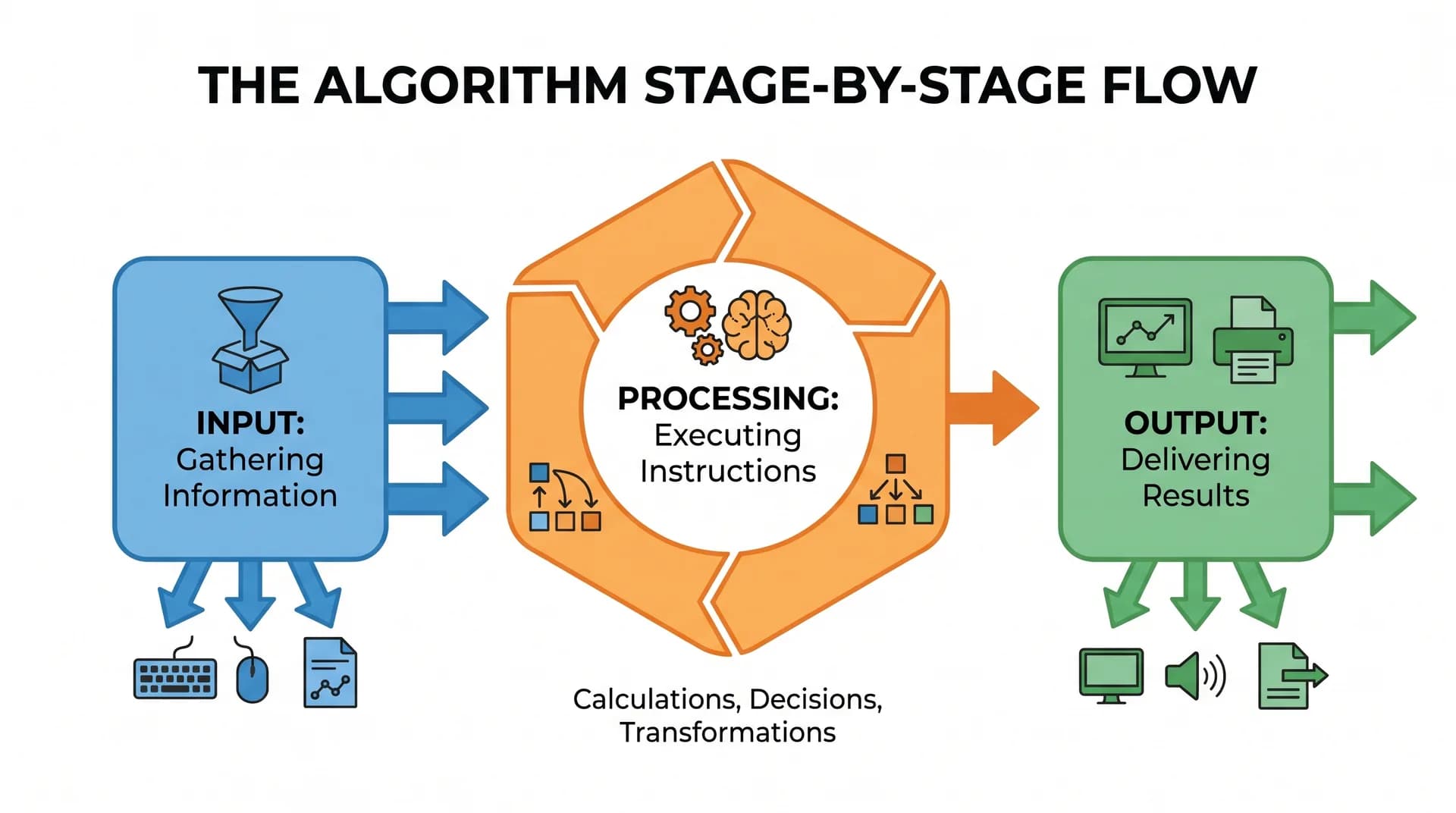
- Input: The information the algorithm receives.
- Processing: The instructions and logical operations the algorithm performs on the data.
- Output: The final result the algorithm produces.
Example: Adding Two Numbers
- Input: 10 and 20
- Processing: Add the two numbers (
10 + 20) - Output: 30
The same applies to more complex problems. Take route finding as an example. The algorithm is given a start point, a destination, and information about the roads. It then processes the road network and produces a route.
An algorithm may also make use of conditional statements, loops (repetitions), and intermediate storage during the course of the processing.
How to Solve Problems Using Algorithms
Learning algorithms isn't simply about memorizing existing solutions. It's about learning to think through a problem systematically. A beginner-friendly problem-solving framework has six steps:
Step 1Understand the Problem
Before writing code, identify exactly what the problem requires. Ask yourself:
- What am I trying to achieve?
- What information will I receive?
- What result should I produce?
- Are there any special edge cases or conditions?
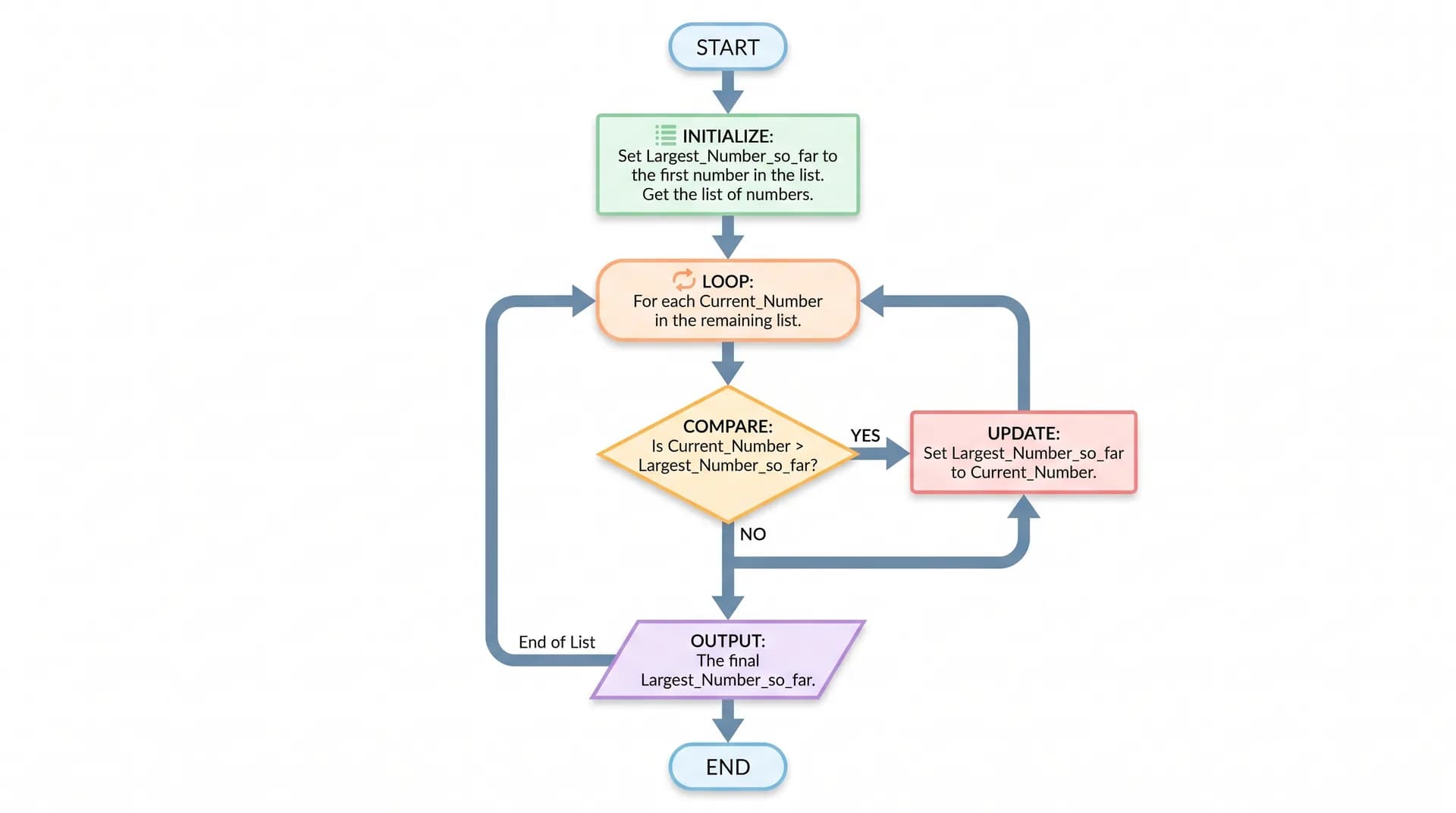
Example problem: "Find the largest number in a list of integers."
Goal: Given a list of numbers, return the single largest value.
Step 2Identify the Input and Output
Define the expected format and types of data clearly to prevent misunderstandings:
- Input: [4, 9, 2, 15, 7]
- Output: 15
Step 3Break the Problem into Smaller Steps
Instead of trying to solve everything at once, divide the problem into manageable instructions (decomposition):
- Assume the first number is the largest so far.
- Examine the remaining numbers one by one.
- Compare each number with the current largest value.
- Update the largest value whenever a larger number is found.
- Return the largest value once all numbers have been inspected.
Step 4Write Pseudocode
Pseudocode describes an algorithm cleanly without tying you to one language's syntax:
START
  Read the list of numbers.
  Set largest = first number.

  FOR each number in the list
    IF number > largest THEN
      largest = number
    END IF
  END FOR

  Display largest
END
Writing pseudocode lets you focus entirely on the logic before getting into programming syntax.
Step 5Test the Algorithm
Test the logic against various cases, including negative numbers and single-element lists, to catch logical bugs:
| Test Input | Expected Output |
|---|---|
[4, 9, 2, 15, 7] | 15 |
[1, 2, 3, 4] | 4 |
[-5, -2, -9] | -2 |
[10] | 10 |
Step 6Analyze and Improve
Once the algorithm works correctly, consider whether it can be improved:
- Does it perform unnecessary operations?
- Does it consume excessive memory?
- Will it still perform efficiently with one million numbers?
Step-by-Step Execution: Finding the Largest Number
Consider the following input list: [12, 5, 28, 9, 17]
Here is how the algorithm processes the list step-by-step:
- Initialization: Set largest = 12 (the first element).
- Inspect 5: Compare 5 with 12. Since 5 is not greater, largest remains 12.
- Inspect
28: Compare28with12. Since28 > 12, updatelargest = 28. - Inspect 9: Compare 9 with 28. Since 9 is not greater, largest remains 28.
- Inspect 17: Compare 17 with 28. Since 17 is not greater, the largest remains 28.
- Result: All numbers have been evaluated. Return 28.
The algorithm looks at each number exactly once. With n numbers in the list, it performs about n comparisons, so it's O(n) time.
Common Types of Algorithms
1. Searching Algorithms
Searching algorithms find a particular item within a collection of data.
- Linear Search: Examines each element sequentially until it finds the target. It works on both sorted and unsorted collections.
- Worst-case time complexity: O(n)
- Binary Search: Repeatedly divides a sorted list in half to zero in on the target.
- Example: In a sorted list [10, 20, 30, 40, 50, 60, 70], searching for 60 inspects the middle value (40), discards the left half, and checks the remainder to find 60 in just two comparisons.
- Worst-case time complexity: O(log n)
- Prerequisite: Data must be sorted, and the data structure must support direct index access.
2. Sorting Algorithms
Sorting algorithms sort the elements (into ascending or descending order).
| Algorithm | How It Works | Typical / Worst Time Complexity |
|---|---|---|
| Bubble Sort | Repeatedly compares adjacent elements and swaps them if out of order | O(n²) |
| Selection Sort | Repeatedly selects the smallest remaining element and places it in order | O(n²) |
| Insertion Sort | Inserts each element into its proper position within an already sorted section | O(n²) |
| Merge Sort | Divides the list into halves, sorts each half, and merges them back together | O(n log n) |
| Quick Sort | Partitions the list around a chosen pivot element and sorts the partitions | O(n log n) average / O(n²) worst |
3. Brute Force Algorithms
A brute force algorithm solves a problem by trying every possible candidate solution.
- Example: Checking every pair of numbers in a list to find two that sum to a target value.
- Trade-off: very easy to understand and implement, but quickly becomes inefficient as the size of the input increases (typically requiring O(n²) comparisons or worse).
4. Divide and Conquer Algorithms
This technique breaks the problem down into smaller, independent subproblems, solves those, and then combines the solutions.
- Process: Divide → Solve → Combine.
- Classic Example: Merge Sort.
5. Greedy Algorithms
A greedy algorithm makes the locally optimal choice at each step, hoping these local choices will lead to a globally optimal solution.
- Characteristics: Fast and intuitive, though it does not guarantee the best outcome for every problem type.
- Common Applications: Activity selection, Huffman coding, Kruskal’s algorithm, and Prim’s algorithm for Minimum Spanning Trees.
6. Dynamic Programming
Dynamic programming solves complex problems by breaking them down into overlapping subproblems and storing the results of each subproblem (memoization/tabulation) to avoid duplicate work.
- Common Applications: Fibonacci sequence calculation, the Knapsack problem, Longest Common Subsequence (LCS), and shortest-path algorithms.
7. Recursive Algorithms
A recursive algorithm solves a problem by having a function call itself with a smaller instance of the same problem.
- Every recursive function needs a base case to terminate. Without one, it runs forever and eventually causes a stack overflow.
- Example: Calculating a factorial:
- Recursive rule:
n! = n × (n - 1)! - Base case:
0! = 1
- Common applications: tree traversals, divide-and-conquer routines, and backtracking problems.
What Is Algorithm Complexity?
An algorithm might get the right answer but still fail in production if it takes too long or uses too much memory. Algorithm complexity is a measure of how the algorithm's resource requirements scale as the size of the input (n) increases:
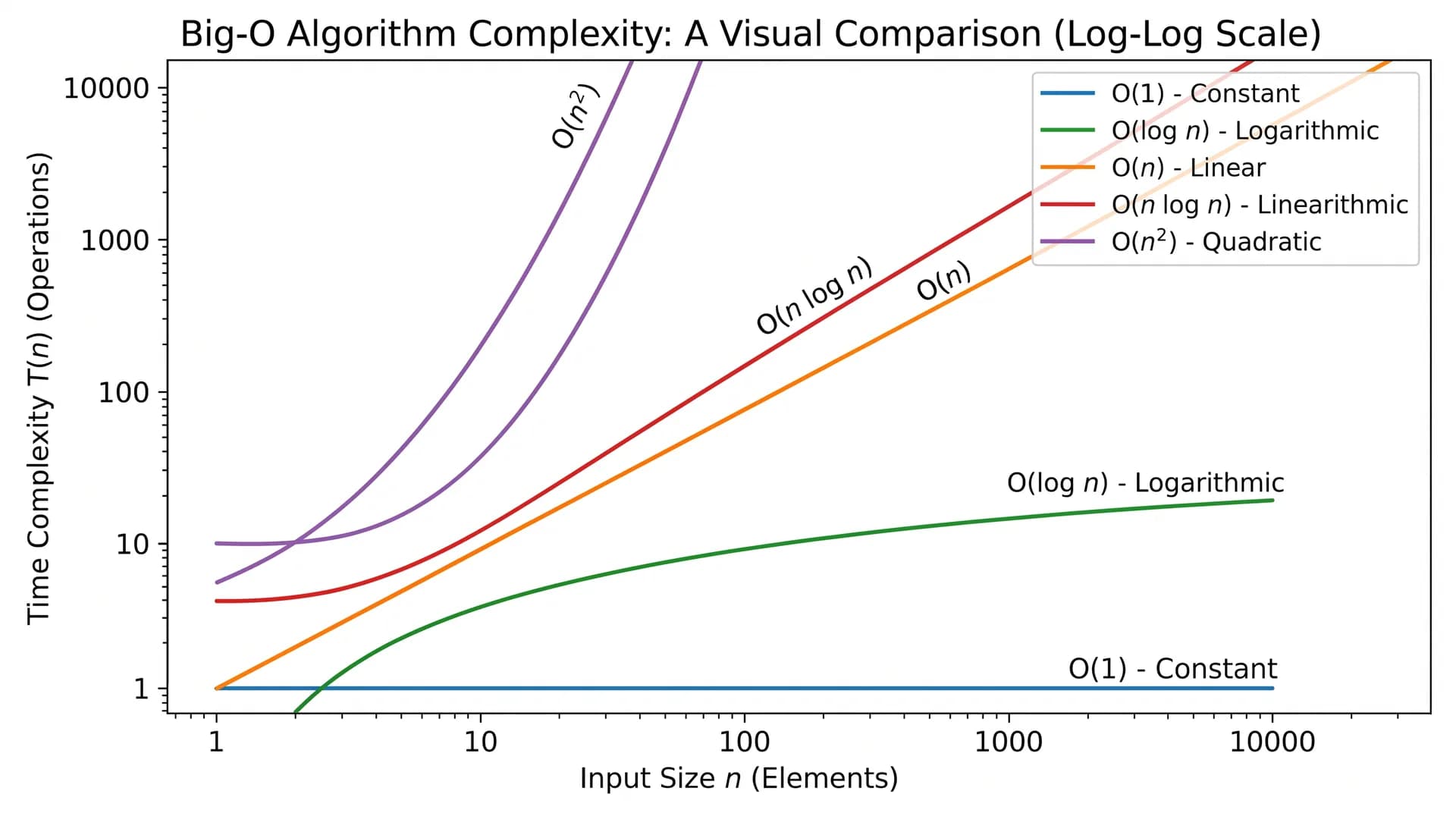
- Time Complexity: How the number of operations increases as the input grows.
- Space Complexity: How much additional memory the algorithm consumes as the input grows.
Why Complexity Matters
Suppose Algorithm A requires n operations while Algorithm B requires n² operations:
- For n=10: Algorithm A takes ~10 operations; Algorithm B takes ~100 operations.
- For n = 1000: Algorithm A takes ~1,000 operations; Algorithm B takes ~1 million operations.
Big O Notation Explained
Big O notation is a mathematical model that is used to describe the upper bound of an algorithm's resource usage as the input size increases.
Common Big O Complexity Classes
| Notation | Name | Practical Example |
|---|---|---|
| O(1) | Constant Time | Accessing an array element by its index |
| O(log n) | Logarithmic Time | Binary search in a sorted array |
| O(n) | Linear Time | Linear search across a list |
| O(n log n) | Linearithmic Time | Merge Sort or Quick Sort (average case) |
| O(n²) | Quadratic Time | Nested loops comparing all pairs of elements |
| O(2ⁿ) | Exponential Time | Naive recursive computation of Fibonacci numbers |
| O(n!) | Factorial Time | Generating all permutations of n items |
Code Examples of Common Complexities
Constant Time: O(1)
The execution time remains identical regardless of whether the collection has 10 items or 10 million items:
def get_first_item(items):
    return items[0]
Linear Time: O(n)
The number of operations scales directly with the number of elements:
def print_items(items):
    for item in items:
        print(item)
Quadratic Time: O(n²)
Commonly occurs when a loop is nested within another loop over the same dataset:
def print_pairs(items):
    for first in items:
        for second in items:
            print(first, second)
Logarithmic Time: O(log n)
Halves the remaining search space on every comparison. A sorted list of 1,024 elements takes at most 10 comparisons (log2(1024) = 10).
Runnable Python Algorithm Implementations
To see how asymptotic classes behave in real code, compare linear scan, logarithmic binary search, divide-and-conquer Merge Sort, and dynamic programming Fibonacci:
1. Linear Search — O(n)
def linear_search(nums, target):
    for idx, value in enumerate(nums):
        if value == target:
            return idx
    return -1
2. Binary Search — O(log n)
def binary_search(sorted_nums, target):
    left, right = 0, len(sorted_nums) - 1
    while left <= right:
        mid = (left + right) // 2
        if sorted_nums[mid] == target:
            return mid
        if sorted_nums[mid] < target:
            left = mid + 1
        else:
            right = mid - 1
    return -1
3. Merge Sort (Divide & Conquer) — O(n log n)
def merge_sort(arr):
    if len(arr) <= 1:
        return arr
    mid = len(arr) // 2
    left = merge_sort(arr[:mid])
    right = merge_sort(arr[mid:])

    merged, i, j = [], 0, 0
    while i < len(left) and j < len(right):
        if left[i] <= right[j]:
            merged.append(left[i]); i += 1
        else:
            merged.append(right[j]); j += 1
    return merged + left[i:] + right[j:]
4. Dynamic Programming (Memoized Fibonacci) — O(n)
def fib_memo(n, memo=None):
    if memo is None:
        memo = {}
    if n <= 1:
        return n
    if n not in memo:
        memo[n] = fib_memo(n - 1, memo) + fib_memo(n - 2, memo)
return memo[n][], a 1-element list, and duplicate values catches 80% of off-by-one bugs before you press run.Is Big O the same as execution time?
No. Big O is about the asymptotic growth rate, not the actual wall-clock time in seconds. An O(n) algorithm could be faster than an O(log n) algorithm on very small inputs, simply because of hardware, the compiler, and lower constant factors. That's the way computer scientists use Big O. They also use Big Theta (Θ) for a tight bound and Big Omega (Ω) for a lower bound.
Algorithms and Data Structures
Algorithms and data structures are tightly coupled:
- An algorithm is the logical procedure for solving a problem.
- A data structure is the format used to organize and store data.
| Data Structure | Primary Role |
|---|---|
| Array | Stores elements sequentially in contiguous memory |
| Linked List | Connects elements via pointer nodes |
| Stack | Manages data using a Last-In, First-Out (LIFO) model |
| Queue | Manages data using a First-In, First-Out (FIFO) model |
| Hash Table | Enables fast average O(1) lookups using key-value pairs |
| Binary Search Tree | Organizes elements hierarchically for efficient search and sorting |
Common Problem-Solving Techniques
- Two Pointers: Uses two markers (often starting at opposite ends of a sorted array) to process data in linear O(n) time instead of brute-force O(n²) time.
- Sliding Window: Maintains a running window over contiguous sub-arrays or sub-strings to avoid recomputing overlapping elements from scratch.
- Backtracking: Systematically explores potential solutions and abandons (backtracks from) paths as soon as they violate problem constraints (e.g., Sudoku solvers, maze navigation, and N-Queens problems).
Beginner Algorithm Learning Roadmap
- Master Programming Fundamentals: Variables, conditional statements, loops, functions, arrays, and basic I/O operations.
- Learn Foundational Algorithms: Linear search, finding min/max values, calculating cumulative sums, and basic swaps.
- Practice with Pseudocode & Flowcharts: Map out logical solutions before translating them into language-specific syntax.
- Master Complexity Analysis: Understand how to recognize O(1), O(log n), O(n), and O(n²) runtimes.
- Study Core Problem-Solving Patterns: Practice two pointers, sliding windows, recursion, divide-and-conquer, and greedy approaches.
- Solve Practice Problems Consistently: Start with easy challenges and gradually progress to intermediate problem sets.
Recommended Learning Platforms
- Harvard CS50: A complete introduction to computer science, basic algorithms, and fundamental data structures.
- Khan Academy: Beginner-level instructional modules on algorithms, binary search, and asymptotic analysis.
- LeetCode: Extensive coding practice on everything from search and sort to recursion, dynamic programming, and data structures.
Frequently Asked Questions
What is an algorithm in simple terms?
An algorithm is a set of well-defined instructions for performing a specific task or solving a particular problem.
What are the five key features of an algorithm?
- Input: Receives zero or more well-defined inputs.
- Output: Produces at least one well-defined result.
- Definiteness: Every step is unambiguous and clearly specified.
- Finiteness: Terminates after a countable, finite number of steps.
- Effectiveness: Every operation is basic enough to be carried out reliably.
Which algorithm is best for a beginner to learn first?
Linear search is the best starting algorithm because its logic matches how a human would manually go through an unsorted list. Finding the maximum in a list and checking for even/odd are also excellent first exercises.
What's the difference between an algorithm and a program?
An algorithm is the abstract mathematical/logical design for solving a problem. A program is the actual implementation of that algorithm in a particular programming language (e.g., Python, Java, C++).
Can several different algorithms solve one problem?
Yes. For instance, you could search through a dataset via a linear search or a binary search. The right one depends on the data size, whether it's pre-sorted, and your memory constraints.
Why are algorithms important in artificial intelligence?
AI systems rely on algorithms to parse datasets, identify statistical patterns, optimize objective functions, and generate predictions. Machine learning models are essentially parameterized algorithms trained on data.
Do I need advanced mathematics to learn algorithms?
No. Introductory algorithms require only basic arithmetic, Boolean logic, and an understanding of variables. As you advance to graph theory, cryptography, or advanced complexity analysis, topics like logarithms, discrete mathematics, and combinatorics become helpful.
Conclusion
Algorithms are the foundation of problem-solving in computer science. They provide a predictable, repeatable methodology for turning inputs into meaningful outputs.
Whether you are building a web application, studying machine learning, or preparing for technical interviews, understanding algorithms will help you write cleaner, faster, and more scalable software. Start with fundamental patterns, analyze their efficiency, and reinforce your knowledge through consistent practice.
Test Your Algorithms Knowledge
Challenge yourself on searching, sorting, recursion, and Big O complexity analysis in this interactive quiz: