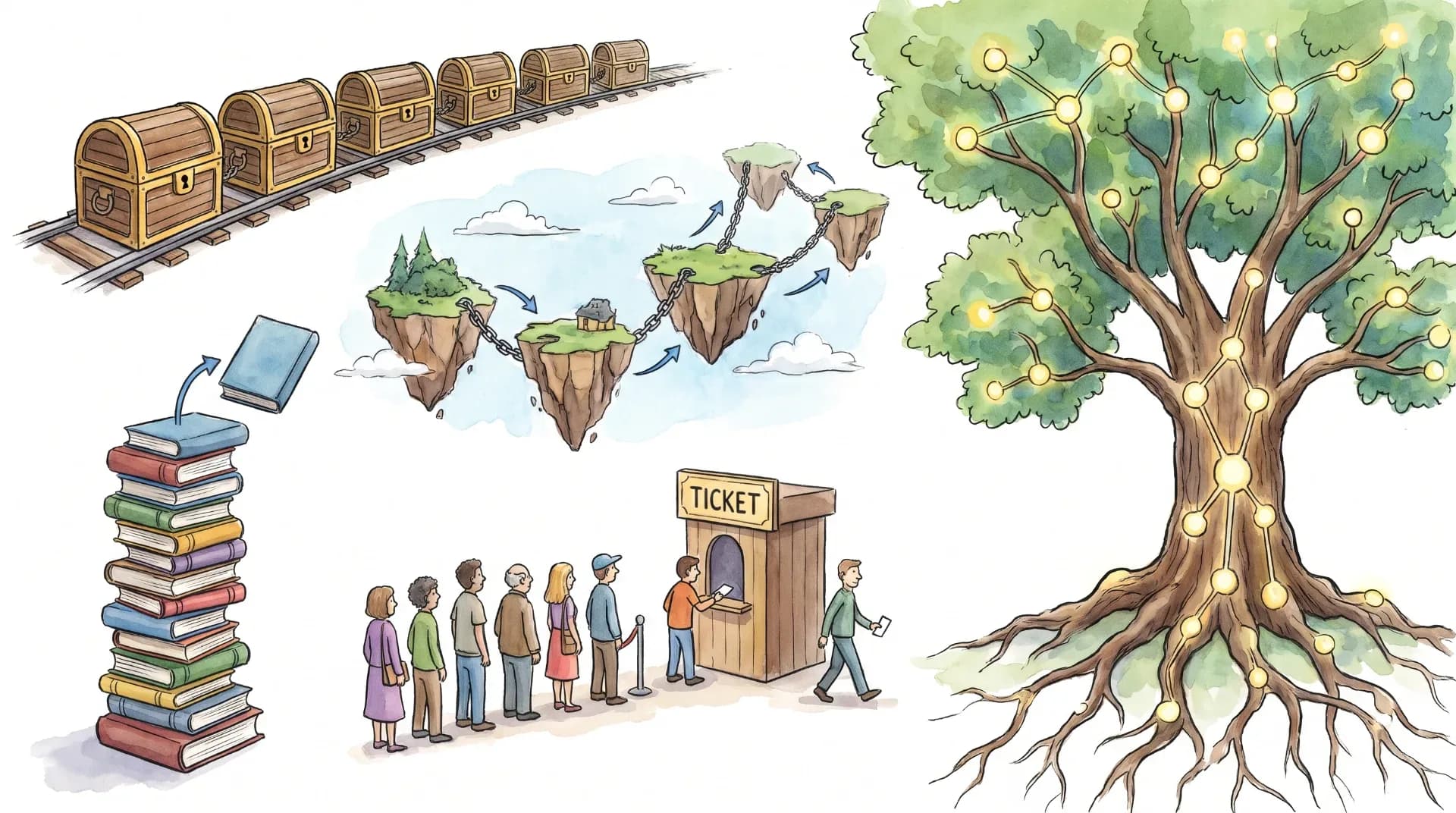
Data Structures Explained: Arrays, Linked Lists, Stacks, Queues, and Trees
Data structures are one of the absolutely fundamental concepts in CS. If you're building a web app, building a database, designing an OS, or indeed any software at all, then data structures are going to be right at the heart of it. You absolutely have to understand them if you want to write good code.
So what exactly is a data structure? How is an array different from a linked list? Why do stacks work on a LIFO (Last In, First Out) principle and queues on a FIFO (First In, First Out) principle? When is it appropriate to use a tree rather than a simple array?
In this guide, you'll learn the fundamentals of data structures with simple explanations, visual examples, time complexity comparisons, and real-world applications.
What is a data structure?
A data structure is a way to organize, store, and manage data in a computer so you can access, modify, and process it efficiently.
Different data structures store the data in different ways. Some store elements in a sequence; others store relationships or hierarchies.
For example, imagine building a student management system. You might use:
- An array to hold the student marks.
- A linked list to manage a collection of records that are constantly changing.
- A stack to implement an undo.
- A queue to manage students queuing for a service.
- A tree to represent the university departments and their sub-departments.
Each structure makes certain operations easier or more efficient.
The data structure you pick can affect how fast your program performs various operations (searching, inserting, deleting, accessing, etc.).
Why Are Data Structures Important?
Data structures are fundamental because they let programmers manage data efficiently as applications grow.
Consider an app with 1 billion user records. It'd be prohibitively expensive to go through every single record to find what you're looking for. The right structure can make a massive difference in the work required for certain operations.
Here are some important benefits:
- Improved performance
The right data structure can reduce the time taken to search, insert, or delete.
- Better memory management
Different structures have different memory footprints. The right structure will help avoid excessive memory usage.
- Easier software development
Well-structured data makes programs much easier to understand, maintain, and extend.
- Better algorithm design
Many algorithms rely on particular data structures. BFS, for instance, uses a queue; DFS can use a stack.
- Stronger programming fundamentals
Data structures are a fundamental part of CS education and a major part of the technical interview process.
Types of Data Structures
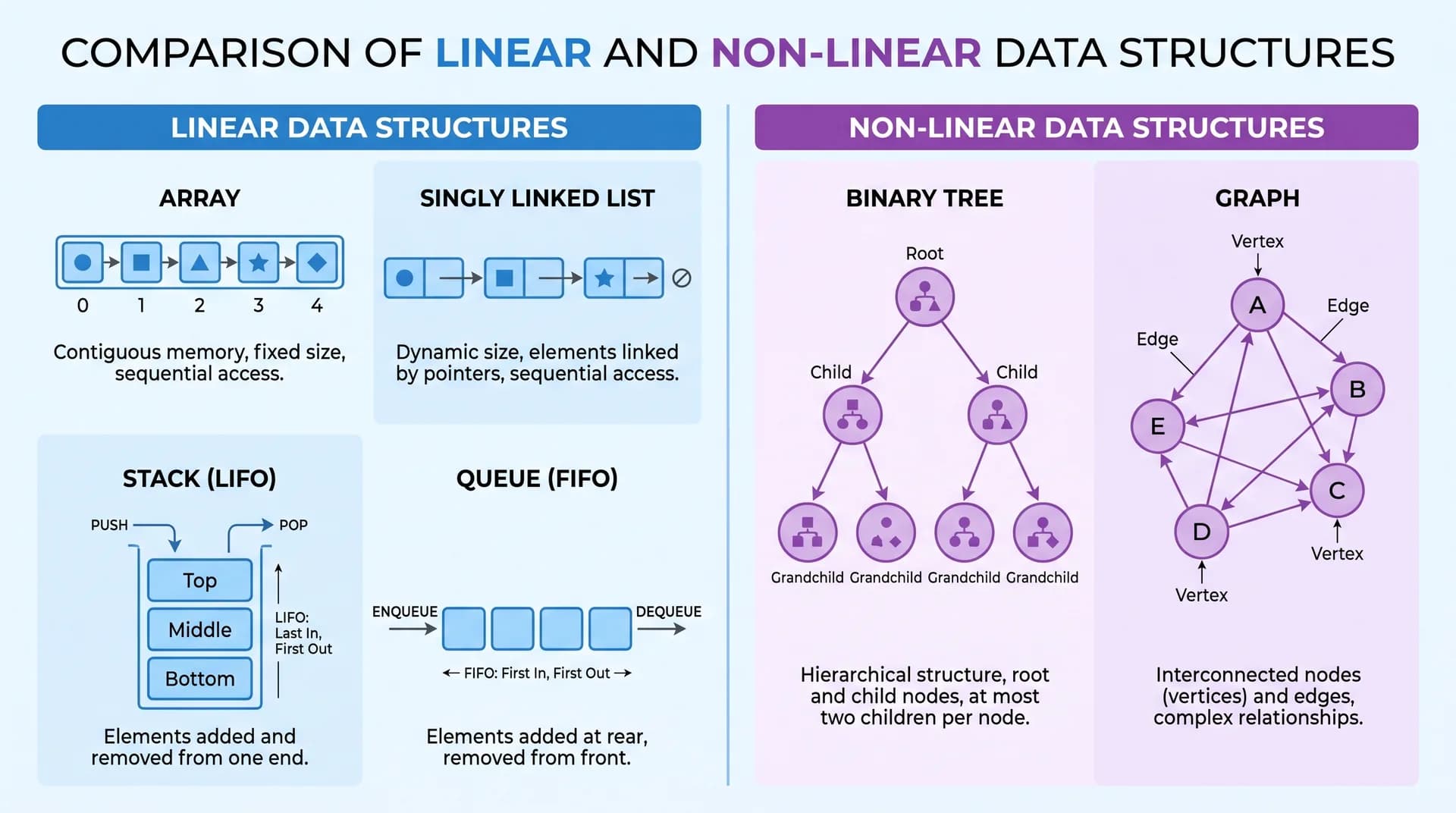
Data structures are generally divided into two broad categories: linear and non-linear.
1. Linear Data Structures
In a linear data structure, the elements are in a sequence.
Each element generally has a logical relationship with the element before it and the element after it.
Examples include:
- Arrays
- Linked lists
- Stacks
- Queues
2. Non-Linear Data Structures
In a non-linear data structure, elements are arranged hierarchically or in a more complex arrangement.
Examples include:
- Trees
- Graphs
A tree organizes data via parent-child relationships, and a graph is a set of connections between vertices.
This helps to introduce the subject, though of course the best way to structure a problem is going to be very much dependent on the operations you're going to be carrying out.
What Is an Array?
An array is a linear data structure that stores elements in indexed positions.
In a traditional array, elements are in contiguous memory locations so that you can calculate an element's location from its index.
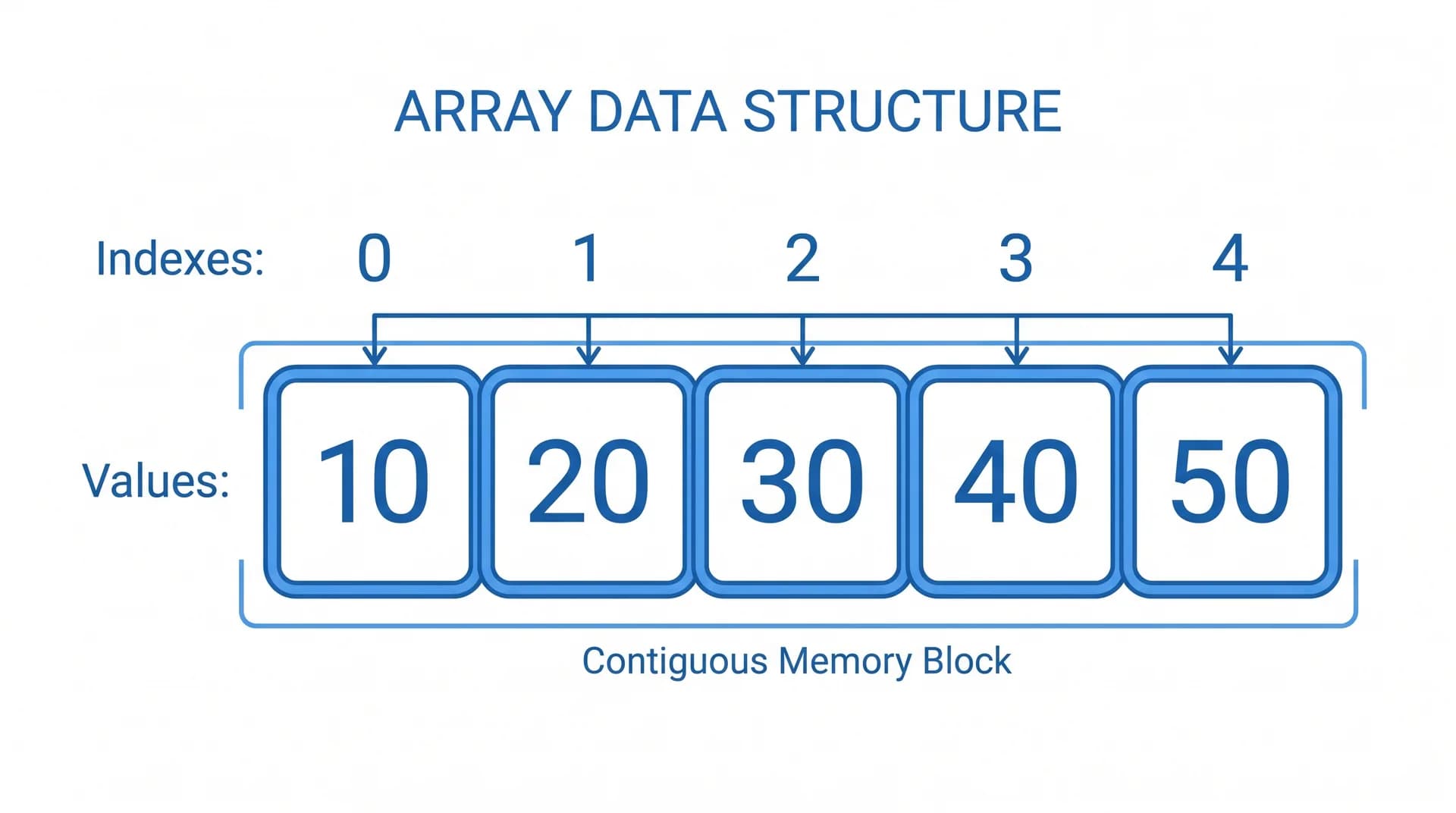
Consider an array containing five numbers:
Index:   0    1    2    3    4
       +----+----+----+----+----+
Array: | 10 | 20 | 30 | 40 | 50 |
       +----+----+----+----+----+
Each element has an index that identifies its position.
For example:
numbers = [10, 20, 30, 40, 50]
print(numbers[0])  # 10
print(numbers[2])  # 30
print(numbers[4])  # 50
In Python, a list is a dynamic array, not a fixed-size array. It's a useful example of an indexed structure.
How does an array work?
When an array sits in contiguous memory, the address of any element at index i can be computed directly in constant time:
Address(A[i]) = Base + i * wWhere:
Baseis the starting memory address of index0.iis the target element index.wis the size of each element in bytes.
This makes access to an array element by index an O(1) operation.
Advantages of Arrays
- Fast access via an index.
- Simple to understand and simple to implement.
- Efficient iteration through elements.
- Good memory locality (which can improve performance).
Disadvantages of Arrays
- Inserting an element in the middle will, of course, require shifting other elements.
- Deleting an element may also require shifting.
- Traditional fixed-size arrays have a fixed capacity.
- Searching an unsorted array takes O(n) time.
Real-World Applications of Arrays
Arrays are commonly used in:
- Storing student marks.
- Representing matrices.
- Implementing sorting algorithms.
- Managing image pixels.
- Building up other data structures such as heaps.
When should you use an array?
Use an array when you need fast indexed access, and your app is going to be reading elements by position quite a bit.
What is a linked list?
A linked list is a linear data structure comprising nodes. Each node contains data and one or more references to other nodes.
A linked list doesn't require the nodes to be in contiguous memory locations (unlike an array).
Each node contains two main components:
- Data: The value stored in the node.
- Pointer or reference: The connection to another node.
How does a linked list work?
Consider the following singly linked list:
Head
 |
 v
+------+------+     +------+------+     +------+------+
|  10  |  o---+---->|  20  |  o---+---->|  30  | NULL |
+------+------+     +------+------+     +------+------+
Each node holds data plus a reference to the next node in sequence. Here is a minimal Python implementation:
class Node:
    def __init__(self, value, next_node=None):
        self.value = value
        self.next = next_node

# Build 10 -> 20 -> 30 -> None
head = Node(10, Node(20, Node(30)))
curr = head
while curr:
    print(curr.value, end=" -> ")
    curr = curr.next
print("NULL")
The first node is the head, and the last node points to NULL (indicating there are no more nodes).
Types of Linked Lists
Three types are commonly discussed.
- Singly Linked List: Each node points strictly forward (
10 -> 20 -> 30 -> NULL). - Doubly Linked List: Each node tracks both previous and next pointers (
NULL <- 10 <-> 20 <-> 30 -> NULL). - Circular Linked List: The final node links back to the head node:
10 -> 20 -> 30
^           |
└───────────┘
Advantages of Linked Lists
- Can grow or shrink dynamically.
- Inserting or deleting a node can be efficient if you already know where the node is.
- Doesn't need contiguous memory allocation.
Disadvantages of Linked Lists
- No direct indexed access.
- Searching for an element is generally an O(n) operation.
- Additional memory is needed for the references.
- Pointer manipulation makes the implementation more complex.
Real-World Applications of Linked Lists
Linked lists can be useful for:
- Implementing stacks and queues.
- Managing sequences of elements.
- Representing certain memory-management structures.
- Building navigation systems that navigate between adjacent items.
When should you use a linked list?
Use a linked list when you're inserting or deleting at known positions a lot and don't need fast random access.
One key point: insertion into the middle of a linked list is not in itself O(1). You could still spend O(n) time finding the position.
What Is a Stack?
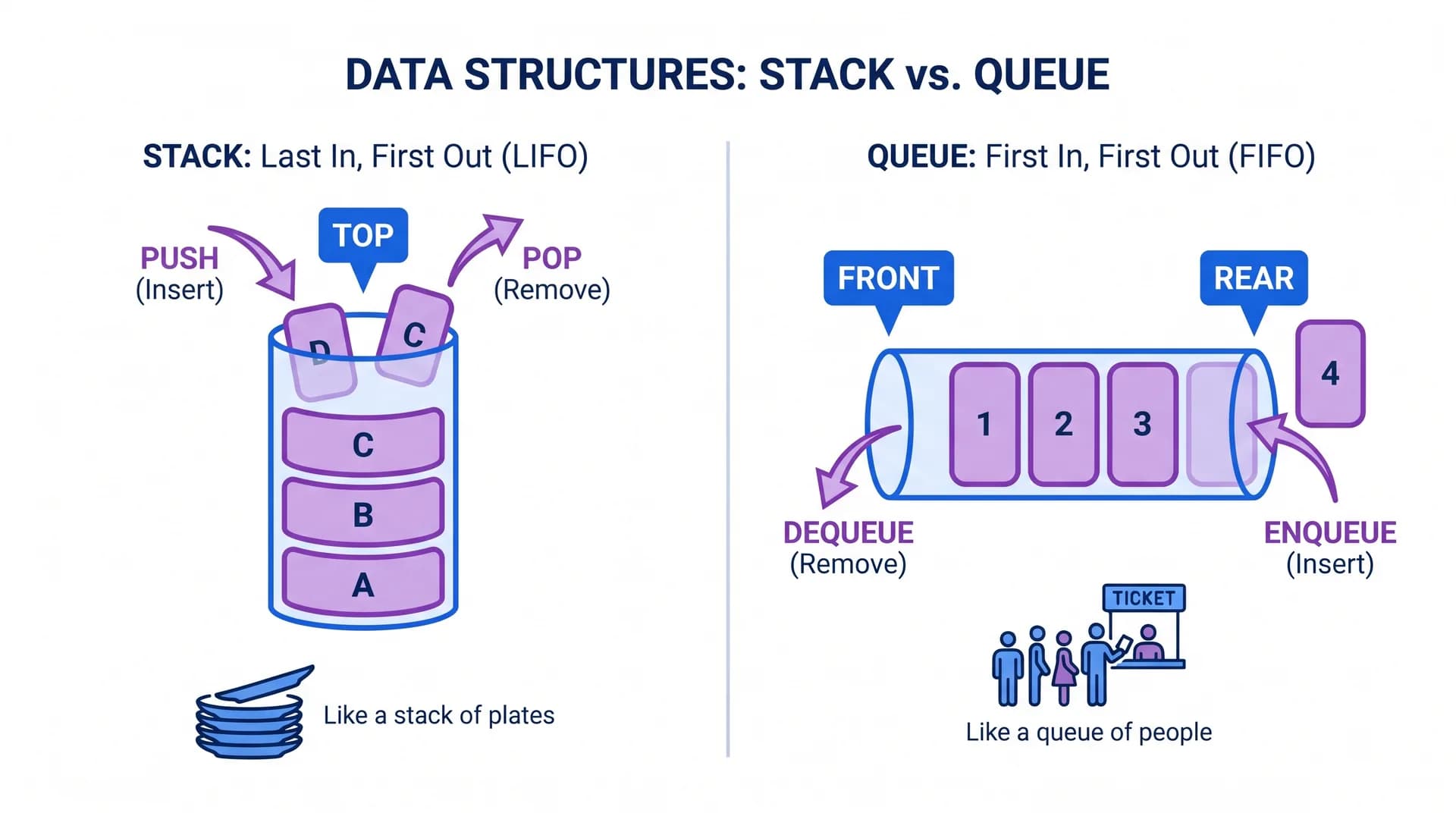
A stack is a linear data structure that operates on the LIFO (Last In, First Out) principle.
This means the last item inserted into a stack is the first item to be removed.
Imagine a stack of plates. You put a new plate on top, and you take off that same plate when you're removing plates.
How does a stack work?
A stack supports three common operations:
| Operation | Description |
|---|---|
| Push | Adds an element to the top |
| Pop | Removes the top element |
| Peek / Top | Returns the top element without removing it |
Example:
stack = []
stack.append(10)
stack.append(20)
stack.append(30)

print(stack.pop())  # 30
print(stack.pop())  # 20
print(stack[-1])    # 10 (peek top element)
Visual state after pushing 10, 20, and 30:
  TOP
   |
+----+
| 30 |  -> Pop returns 30 first
+----+
| 20 |  -> Pop returns 20 second
+----+
| 10 |
+----+
The most recently added element is removed first.
Advantages of Stacks
- Simple to implement.
- Push and pop operations can be carried out in O(1) time.
- Useful for managing nested operations and for reversing sequences.
Real-World Applications of Stacks
Stacks are used in:
- Undo and redo functionality.
- Browser history implementations.
- Function call management.
- Expression evaluation.
- Parentheses matching.
- Depth-first search.
When should you use a stack?
Use a stack when you need the most recently added item to be the first one processed.
What Is a Queue?
A queue is a linear data structure that operates on the FIFO (First In, First Out) principle.
The first item put into a queue is the first item taken out.
Think of a queue of people at the bank. The person who gets there first is generally the one who gets served first.
How does a queue work?
A queue has two important ends:
- Front: The position from which the elements are taken.
- Rear: The position at which new elements are inserted.
The main operations are:
| Operation | Description |
|---|---|
| Enqueue | Adds an element to the rear |
| Dequeue | Removes an element from the front |
| Peek / Front | Returns the front element |
Example:
from collections import deque

queue = deque()
queue.append(10)
queue.append(20)
queue.append(30)

print(queue.popleft())  # 10
print(queue.popleft())  # 20
print(queue[0])        # 30
Visual state after enqueueing 10, 20, and 30:
Enqueue: 10, 20, 30

Front           Rear
  |               |
  v               v
+----+----+----+
| 10 | 20 | 30 |
+----+----+----+

Dequeue -> 10 (first in, first out)
Dequeue -> 20
Types of Queues
- Simple Queue
Elements are inserted at the rear and removed from the front.
- Circular Queue
The last position links back to the first position, allowing available space to be reused.
- Priority Queue
Elements are processed according to priority rather than in strict order of insertion.
- Double-Ended Queue (Deque)
Elements can be inserted and removed from either end.
Advantages of Queues
- Maintains processing order.
- Efficient enqueues and dequeues when properly implemented.
- Useful for managing tasks and requests.
Real-World Applications of Queues
 Queues are used in:
- Operating system scheduling.
- Print job management.
- Network packet processing.
- Customer service systems.
- Breadth-first search (BFS).
- Background task processing.
When should you use a queue?
Use a queue when you want the tasks to be processed in the order they arrive.
For a standard FIFO queue, you can implement both enqueue and dequeue in O(1) time with the right implementation.
What Is a Tree Data Structure?
A tree is a non-linear data structure that organizes data into a hierarchy of connected nodes.
Trees are different from arrays, linked lists, stacks, and queues in that their elements aren't arranged in a single linear sequence.
A tree is a set of nodes connected by edges.
Important Tree Terminology
Consider this binary tree:
        50
      /    \
    30      70
   /  \    /  \
20 40 60 80| Term | Meaning |
|---|---|
| Root | The topmost node, 50 |
| Parent | A node that has child nodes |
| Child | A node connected below another node |
| Leaf | A node with no children |
| Edge | A connection between two nodes |
| Subtree | A smaller tree within a larger tree |
| Height | The length of the longest downward path, measured in edges |
In this example, 50 is the root, 30 and 70 are its children, and 20, 40, 60, and 80 are the leaf nodes.
What Is a Binary Tree?
A binary tree is a tree in which each node has at most two children:
- Left child
- Right child
Binary trees are widely used in CS because they represent hierarchy well and can be searched very efficiently when they're in the right form.
What Is a Binary Search Tree (BST)?
A Binary Search Tree is a binary tree that follows a specific ordering rule:
- Values in the left subtree are less than the node's value.
- Values in the right subtree are greater than the node's value.
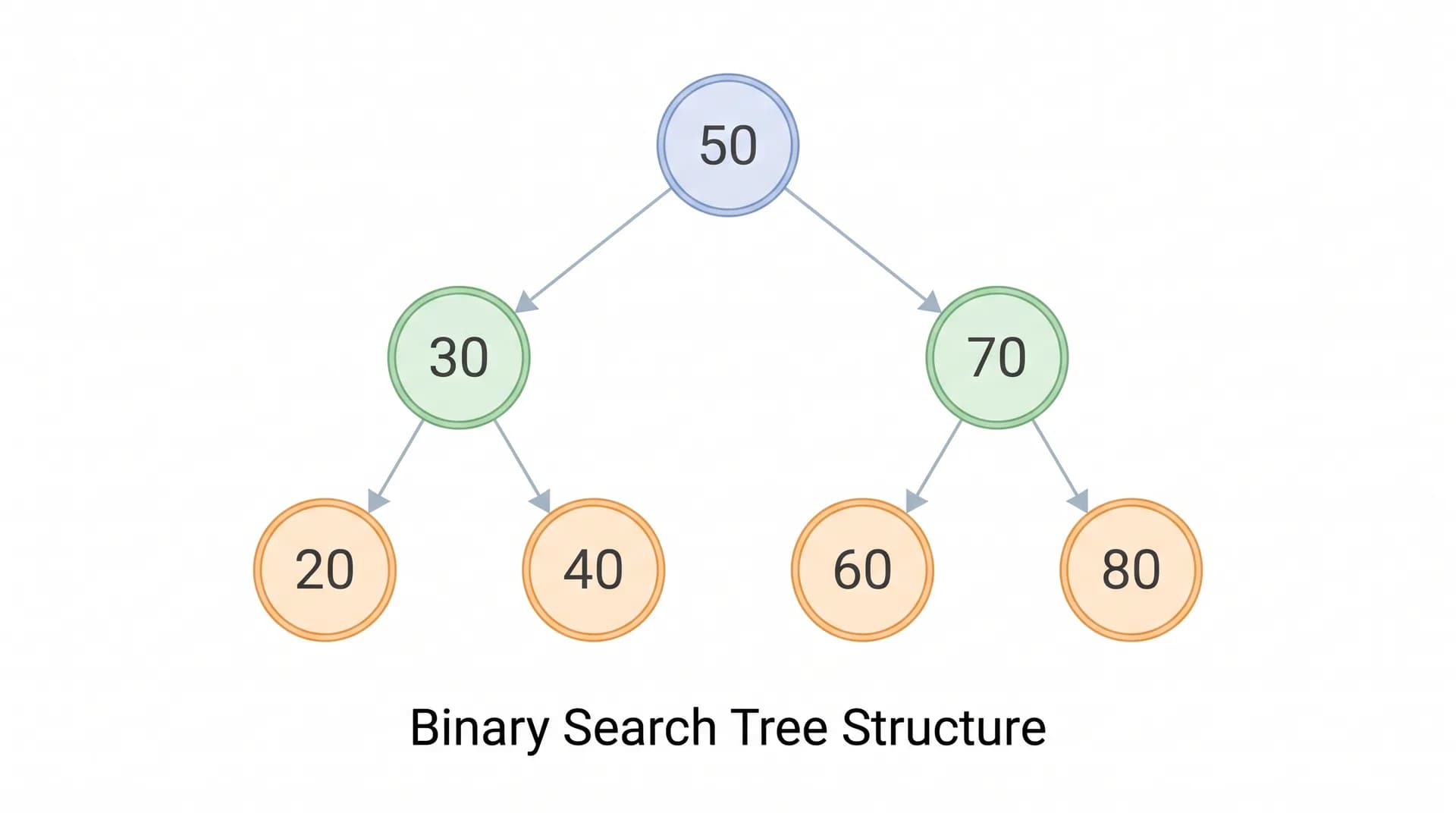
For example, here is the same structure implemented as a Binary Search Tree lookup in Python:
class TreeNode:
    def __init__(self, val):
        self.val = val
        self.left = None
        self.right = None

def search_bst(root, target):
    curr = root
    while curr:
        if target == curr.val:
            return True
        curr = curr.left if target < curr.val else curr.right
    return False
To search for 60:
- Start at 50.
- As 60 is greater than 50, we move right.
- Compare 60 with 70.
- As 60 is less than 70, we go left.
- Find 60.
A well-balanced BST can support the three operations (search, insert, delete) in O(log n) time.
However, a normal BST can become unbalanced. In the worst case, its height can be as much as n-1, which makes those operations O(n).
Balanced trees (AVL trees, Red-Black trees, etc.) are all designed to provide better height bounds.
Tree Traversal Methods
Tree traversal means visiting the nodes of a tree in some order.
The three common depth-first traversal methods are:
- Inorder Traversal
Left → Root → Right
For a Binary Search Tree, inorder traversal visits values in sorted order.
- Preorder Traversal
Root → Left → Right
Useful for representing or copying tree structures.
- Postorder Traversal
Left → Right → Root
Useful when processing the child nodes before the parent.
Another important traversal is Level-Order traversal, which visits nodes level by level and is generally implemented using a queue.
Real-World Applications of Trees
Trees are used in:
- File systems and directory structures.
- Database indexing.
- HTML and XML document representation.
- Search engines.
- Expression parsing.
- Hierarchical organizational structures.
When should you use a tree?
Use a tree when you've got hierarchical data or when you need efficient searching, ordered data, or structured traversal.
Data Structure Time Complexity Comparison
Understanding time complexity lets you assess how efficiently a data structure performs various operations.
Big O notation describes how work increases as input size increases.
For example:
O(1): Constant time.O(log n): Logarithmic time.O(n): Linear time.O(n log n): Linearithmic time.O(n²): Quadratic time.
The following table lists common operations.
| Data Structure | Access | Search | Insert | Delete |
|---|---|---|---|---|
| Array | O(1) | O(n) | O(n)* | O(n)* |
| Singly Linked List | O(n) | O(n) | O(1)** | O(1)** |
| Stack | O(n)*** | O(n)*** | O(1) | O(1) |
| Queue | O(n)*** | O(n)*** | O(1) | O(1) |
| Balanced BST | O(log n)**** | O(log n) | O(log n) | O(log n) |
- Insertion or deletion in the middle of an array requires a shift of elements. Appending to a dynamic array is amortized O(1) (though an individual resize could be O(n)). ** For a linked list insertion or deletion is O(1) if you already know the node or position you want to operate on. Finding that node/position could be O(n). *** Stack and queue operations are restricted to the ends that are accessible. Access and search are not the operations they're designed for. **** A balanced BST doesn't allow you to do direct array-style indexed access, you'd have to do some work to find the element at a given rank.
These complexities assume conventional implementations. Different implementations and definitions of operations will of course lead to different results.
Which Data Structure Is Faster?
No single data structure is fastest for every operation.
- Arrays are great for accessing elements by index.
- Linked lists are useful for inserting or deleting known nodes.
- Stacks are efficient for LIFO operations.
- Queues are efficient for FIFO operations.
- Balanced trees help maintain ordered data while still allowing efficient searches and updates.
The right choice depends on what your application does most often.
Array vs Linked List vs Stack vs Queue vs Tree
Here's a quick comparison to help you understand the fundamental differences.
| Feature | Array | Linked List | Stack | Queue | Tree |
|---|---|---|---|---|---|
| Organization | Sequential | Connected nodes | LIFO | FIFO | Hierarchical |
| Access | By index | Sequential traversal | Top only | Front / rear | By traversal or search |
| Main strength | Fast indexed access | Flexible node updates | Reverse processing order | Ordered task processing | Hierarchical organization |
| Memory | Compact in typical implementations | Extra references | Depends on implementation | Depends on implementation | Depends on implementation |
| Example | Student marks | Dynamic records | Undo feature | Print queue | File system |
The key difference is in how each structure organizes the data and which operations it makes efficient.
How to Choose the Right Data Structure
Choosing a data structure is much easier if you can figure out which operations your application will do most often.
Use the following practical guide:
| Requirement | Recommended Structure |
|---|---|
| Access elements using an index | Array |
| Frequently insert or delete known nodes | Linked List |
| Reverse the order of operations | Stack |
| Process tasks in arrival order | Queue |
| Organize hierarchical information | Tree |
| Search ordered data efficiently | Balanced BST |
| Process tasks based on priority | Priority Queue |
Practical Example: Building a Student Management System
Imagine you're building a uni student management app.
Different data structures may best serve different features.
Student marks: an array can hold the marks for a fixed set of subjects. Getting the mark for a particular subject is trivial.
Undo functionality: a stack can be used to store the most recent undone actions. The most recent undone action can be undone first.
Student service requests: a queue can handle requests in the order they arrive.
University hierarchy: a tree can represent faculties, departments, and academic programs.
This is a good example of the principle that a real application doesn't need to use just one data structure. Different bits of the application can use different structures to solve different problems.
Frequently Asked Questions (FAQs)
1. What are the five main data structures?
Arrays, linked lists, stacks, queues, and trees are the five most commonly studied data structures. Arrays and linked lists are both linear data structures. Stacks and queues are linear data structures that restrict how you can access data. Trees are a hierarchical data structure.
2. What is the difference between an array and a linked list?
An array stores its elements in indexed positions and will typically give you O(1) access by index. A linked list stores elements in connected nodes, and you have to traverse to reach a particular position. Arrays are generally the better option if you're doing indexed access; linked lists can be useful in certain circumstances where you're doing updates at a known position.
3. What's the difference between a stack and a queue?
A stack is LIFO (Last In, First Out), so the last element in is the first one out. A queue is FIFO (First In, First Out), so the first element in is the first one out.
4. What's the difference between a binary tree and a Binary Search Tree?
A binary tree is one in which each node can have at most two children. A Binary Search Tree is a binary tree with an ordering constraint: smaller values go in the left subtree and larger values in the right subtree (subject to the implementation's policy on duplicates).
5. What data structure is best for searching?
The best structure depends on the type of search you're doing.
- Arrays provide fast access via index.
- Hash tables provide average-case constant-time key lookups under appropriate assumptions.
- Balanced Binary Search Trees enable ordered searching in O(log n) time.
- Unsorted linked lists take O(n) time to search.
6. What is Big O notation in data structures?
Big O notation describes how an operation's resource requirements scale as the input size increases. It's used to compare the time and space complexity of different data structures and algorithms.
7. Are data structures important for coding interviews?
Yes, data structures are commonly used in coding interview questions because they're a great way to demonstrate problem-solving, your ability to design an algorithm, and your understanding of the solution's efficiency.
8. What should I learn after the basic data structures?
After understanding arrays, linked lists, stacks, queues, and trees, consider learning:
- Hash tables
- Heaps and priority queues
- Graphs
- Searching algorithms
- Sorting algorithms
- Recursion
- Dynamic programming
These topics build on the basic concepts introduced in this article.
Conclusion
Data structures are the basic building blocks of modern software development, and they help programmers organize information and carry out operations efficiently.
In this guide, we explored five important data structures:
- Arrays: store elements in indexed positions for fast access.
- Linked Lists: link the nodes together to enable a flexible data structure.
- Stacks: Last In, First Out.
- Queues: First In, First Out.
- Trees: organize information into a hierarchical structure.
Understanding these structures is the first step to mastering Data Structures and Algorithms (DSA).
The key lesson is that the right data structure for a problem is the one best suited to the particular problem you're trying to solve. What's excellent for one operation may be terrible for another.
To get a proper grasp of them, implement the structures, work out their time complexities, and then solve some coding problems that use them.
Keep learning with NeuraQuiz and build up your programming fundamentals via quizzes and challenges.
Test Your Data Structures Knowledge
Check your mastery of arrays, linked lists, stacks, queues, and trees with our interactive quiz: