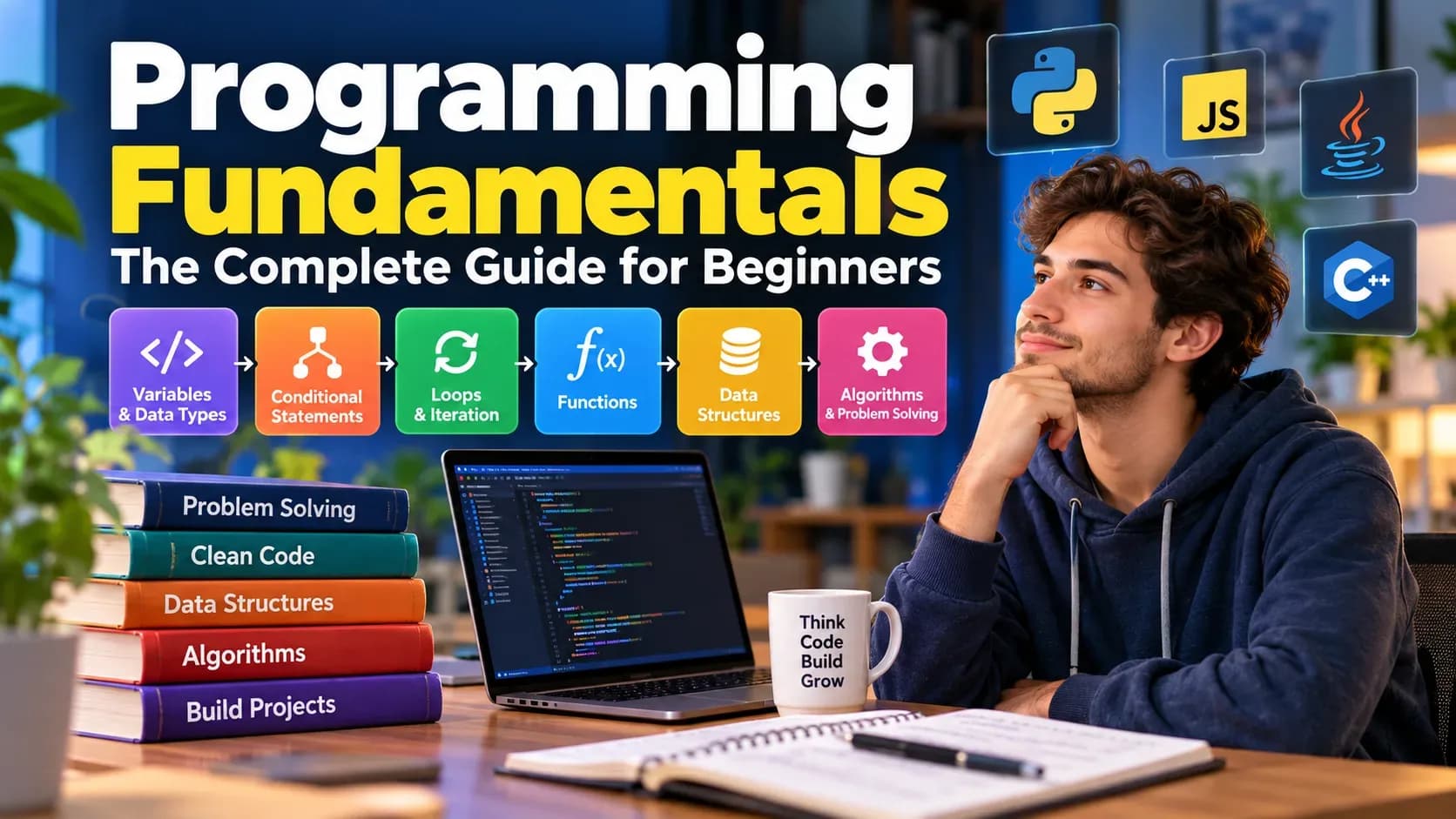
What Are Programming Fundamentals?
The fundamental principles of programming are the basic concepts and techniques for solving problems in order to produce computer programs; these comprise variables, data types, operators, conditions, loops, functions, data structures, algorithms, debugging, and logical thinking.
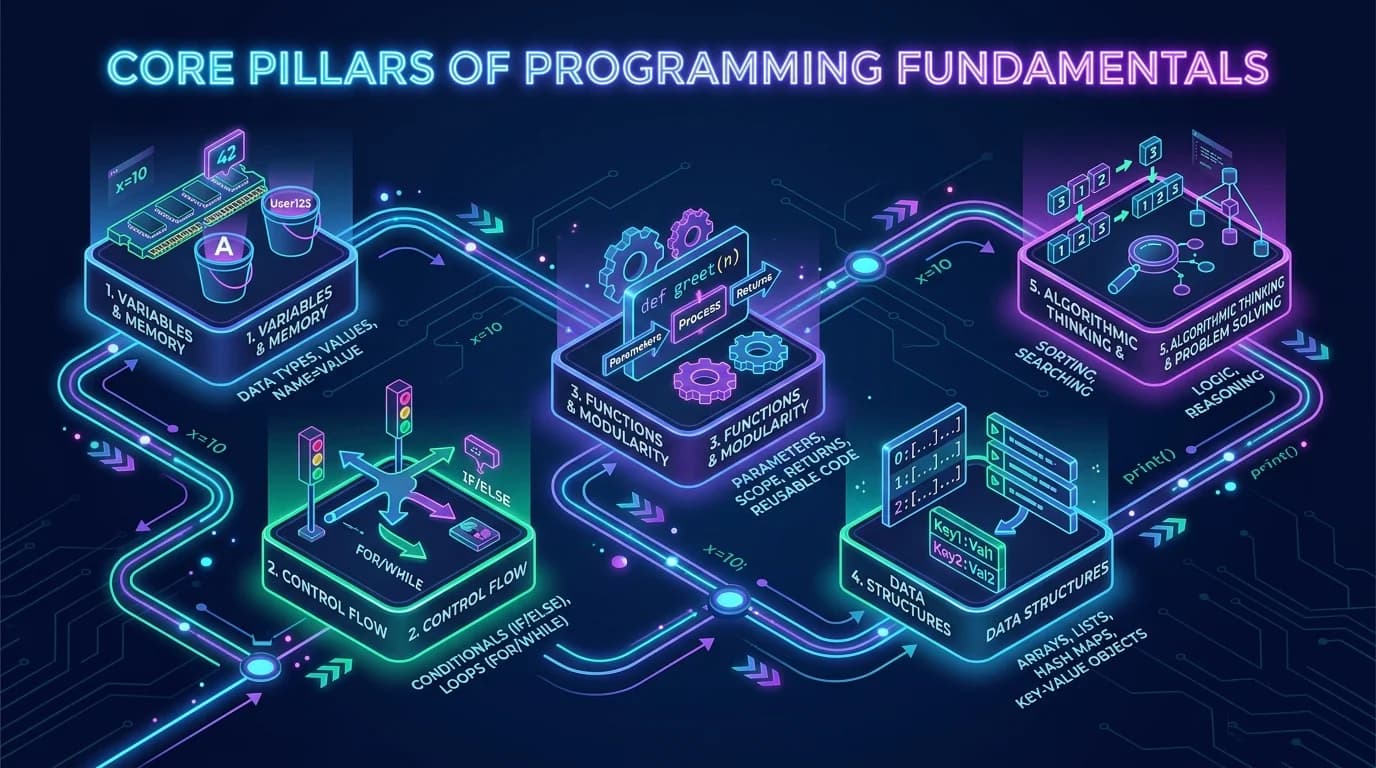
These ideas are not specific to any single programming language; you can learn them using Python, JavaScript, Java, C++, C#, Go, or another language and then use them in other languages as well.
For example, the syntax for creating a variable differs between languages, but the underlying idea remains the same:
Save some information so that ththat the program can use it later.
By learning these basics, people who are just getting started are given a basis on which to build websites, applications, games, automation scripts, data tools, and other types of software.
Why Programming Fundamentals Matter
Programming languages change, some frameworks become popular and others become unpopular, and development tools keep on evolving. Since fundamental programming concepts explain how software is constructed and how programmers think about problems, they usually remain useful.
A strong foundation helps you:
- Understand unfamiliar code.
- Learn new programming languages more easily.
- Break big problems into smaller tasks.
- Identify and fix errors.
- Write reusable code.
- Learn about algorithms and data structures.
- Work in an effective manner using development tools.
- Build projects independently.
- Make technical ideas easier to understand.
A beginner can remember syntax without understanding programming, but remembering syntax alone is not the same as being able to solve problems with code.
We want to understand why code works, not just memorise what to type.
How Programming Languages Work
A programming language consists of rules which allow instructions to be expressed in a form that computers can process.
People naturally use languages like English, Spanish, or Sinhala for communication. Computers run on machine-level instructions, and programming languages give humans a practical way to describe operations without writing each low-level instruction.
Different languages use different rules and ways to run code.
For example, Python allows:
print("Hello, world!")
JavaScript can use:
console.log("Hello, world!");
Although the syntax differs, both examples express the same basic idea: producing output.
Compiled and interpreted approaches
Programming languages can use various mechanisms to run programs.
A compiler converts source code into a different form before execution, while an interpreter runs the code using a runtime system. Today, various languages and their implementations combine techniques such as compilation, interpretation, bytecode, and just-in-time compilation.
For beginners, the important concept is simple:
You write source code, after which language tools either modify it or carry out the code so that the computer can carry out the requested operations.
Variables and Constants
Variables are named memory containers that store values, while constants remain fixed throughout program execution:
# Python Example
user_name = "Jordan"
user_score = 85
PASSING_GRADE = 70  # Constant convention

is_passed = user_score >= PASSING_GRADE
print(f"{user_name} passed: {is_passed}")// JavaScript Equivalent
const userName = "Jordan";
let userScore = 85;
const PASSING_GRADE = 70;
const isPassed = userScore >= PASSING_GRADE;
console.log(`${userName} passed: ${isPassed}`);A variable is a named reference that stores or represents the data that a program needs.
For example:
name = "Alex"
age = 20
In this case, 'name' means 'text' and 'age' refers to a number.
Variables let programs handle information dynamically.
Instead of writing:
print("Alex")
print("Alex")
print("Alex")
you can use:
name = "Alex"
print(name)
print(name)
print(name)
This is particularly useful when values come from users, files, databases, APIs, or calculations.
Constants
A constant is a value that is intended to remain unchanged during a given program or scope.
How constants are handled varies by language. For instance, some languages include explicit constant declarations, while others rely on naming conventions or language-specific mechanisms.
The broader concept is worth remembering:
Variables are used to represent information that can change, while constants are used to represent values that are intended to stay fixed.
Data Types
A data type specifies the kind of value a program is dealing with and the operations suitable for that value.
Common categories include:
Numbers
Numbers are used to represent quantities for the purpose of calculation.
age = 25
price = 19.99
The way in which integers and floating-point numbers are represented can vary from one language to another.
Strings
A string represents text.
name = "Maria"
Message = "Welcome to programming!"
Strings can usually be combined, searched, compared, formatted, and transformed.
Boolean values
Boolean values represent two logical states:
True
False
They are essential for decision-making.
For example:
is_logged_in = True
Collections
Programs frequently need to store multiple values.
Examples include:
- Arrays
- Lists
- Sets
- Maps
- Dictionaries
- Objects
- Records
The exact names and capabilities depend on the programming language.
Understanding data types helps you choose appropriate operations and avoid many common programming errors.
Operators
Operators allow programs to perform calculations, comparisons, assignments, and logical operations.
Arithmetic operators
Common arithmetic operations include:
-
*
/
For example:
total = price * quantity
Comparison operators
Comparison operators determine relationships between values.
Examples include:
==
!=
>
<
>=
<=
For example:
age >= 18
This expression produces a logical result that can be used in a decision.
Logical operators
Logical operators combine conditions.
For example:
age >= 18 and has_id
Common logical concepts include:
- AND
- OR
- NOT
These become especially important when programs contain multiple rules.
Input and Output
Most useful programs need some way to receive information and produce results.
Input is data that enters a program.
The information a program produces is the output.
For example, a simple application might:
- Request the user's name.
- Receive the name.
- Process the information.
- Display a personalised message.
In Python, a basic console example might look like:
name = input("What is your name? ")
print("Hello,", name)
While the syntax may differ from one programming language to another, the basic idea is the same.
Input can come from many places:
- Keyboard
- Files
- Databases
- Web forms
- APIs
- Sensors
- Other applications
Output can also appear on screens, be stored in files, be transmitted over networks, or be passed on to another system.
Conditional Statements
Conditionals allow your application to make decisions based on logical evaluations:
score = 88

if score >= 90:
    print("Grade: A (Mastery)")
elif score >= 75:
    print("Grade: B (Proficient)")
elif score >= 60:
    print("Grade: C (Needs Practice)")
else:
    print("Review concepts and retry")
Programs often need to make decisions.
For example:
- Show the user's account if they are logged in.
- When a payment is successful, you should confirm the order.
- When a number is negative, handle it differently.
- If the file is missing, then show a suitable message.
Conditional statements can make decisions.
A basic example is:
age = 20
if age >= 18:
print("Adult")
else:
print("Under 18")
It checks a condition and then selects the suitable path.
Multiple conditions
Programs can also evaluate multiple possibilities:
score = 75
if score >= 90:
grade = "A"
elif score >= 80:
grade = "B"
elif score >= 70:
grade = "C"
else:
grade = "Needs improvement"
While the specific syntax may differ, the logical structure is the same across programming languages.
Loops and Iteration
Loops allow computers to automate repetitive tasks reliably without duplicating code:
questions = ["Variables", "Control Flow", "Functions", "Data Structures"]

for index, topic in enumerate(questions, start=1):
    print(f"Drill {index}: {topic}")
A program can repeat an operation by using a loop.
It would be impractical to write out the same instructions 1,000 times if you were processing 1,000 records.
A loop can make repetition happen automatically.
For example:
for number in range(5):
print(number)
A program can also continue repeating while a condition remains true:
count = 0
while count < 5:
print(count)
count += 1
Common types of loops
Depending on the language, you may encounter:
- for loops
- while loops
- do-while loops
- Iterators
- Collection-based loops
Although loops are powerful, beginners should understand how termination works.
A loop will become infinite if it never reaches the condition required to stop.
Functions
Functions bundle discrete operations into reusable blocks that accept inputs (arguments) and return outputs:
def calculate_quiz_result(correct, total):
    percentage = (correct / total) * 100
    feedback = "Pass" if percentage >= 70 else "Retry"
    return round(percentage, 1), feedback

score_pct, status = calculate_quiz_result(18, 20)
print(f"Result: {score_pct}% - Status: {status}")
# Output: Result: 90.0% - Status: Pass
A function is a piece of logic that can be reused to carry out a specific task.
For example:
def greet(name):
return "Hello, " + name
You can then use it:
message = greet("Alex")
print(message)
Functions make programs easier to organise because they let developers break big problems into smaller ones.
A function may have:
- A name
- Parameters
- A body
- A return value
For example:
def add(a, b):
return a + b
In this case, a and b are parameters, and the function gives their sum.
Why functions matter
Functions can improve:
- Reusability
- Organization
- Testing
- Readability
- Maintenance
A good habit for beginners is to avoid writing an entire program as one big block of code.
Rather, determine what logical tasks are and decide if they should be turned into separate functions.
Arrays and Collections
Programs often handle groups of related information.
For example:
fruits = ["apple", "banana", "orange"]
Instead of using a different variable for each fruit, a collection keeps related values together.
Different languages offer different collection types.
Arrays and lists
They usually represent ordered collections.
Sets
Sets are helpful when you need a group of values that are all different.
Maps or dictionaries
They establish relationships between keys and values.
For example:
person = {
"name": "Alex",
"age": 25
}
The data structure you choose can affect how easily and efficiently your program performs certain operations.
That is where we come to the study of data structures and algorithms.
Algorithms and Problem Solving
An algorithm is a clearly defined procedure for solving a problem or completing a task.
An algorithm doesn't have to be written as computer code.
For example, a simple everyday algorithm could be:
- Read a recipe.
- Gather ingredients.
- Follow the preparation steps.
- Cook the food.
- Serve it.
Programming algorithms work the same way: they provide a series of steps for processing information or solving a problem.
A practical problem-solving process
When facing a programming problem:
1. Understand the problem
Work out exactly what has to happen.
2. Identify inputs
What information does the program receive?
3. Identify outputs
What should the program produce?
4. Break the problem down
Divide the task into smaller operations.
5. Design the solution
Use pseudocode, diagrams, or plain language before writing code.
6. Implement
Translate the solution into a programming language.
7. Test
Check normal, unusual, and invalid inputs.
8. Debug
Find and correct problems.
This process is often more important than memorising syntax.
Debugging and Error Handling
Errors are a normal part of programming.
Even experienced developers encounter bugs.
Three broad categories are useful for beginners.
Syntax errors
These occur when code does not follow the language's rules.
For example, missing punctuation or incorrectly structured code may cause a syntax error.
Runtime errors
These occur while a program is running.
For example, a program might attempt an operation that cannot be performed with the supplied data.
Logic errors
The program runs but produces the wrong result.
These can be particularly challenging because the computer may not report an error.
A practical debugging process
When something goes wrong:
- Reproduce the problem.
- Read the error message carefully.
- Identify where the problem occurs.
- Check the values involved.
- Test smaller pieces of the program.
- Make one change at a time.
- Run the test again.
Avoid randomly changing multiple lines at once. You want to understand why the problem occurs.
Object-Oriented Programming Basics
Object-oriented programming, often called OOP, is a programming approach built around objects and the data and behaviour associated with them.
Common OOP concepts include:
- Classes
- Objects
- Attributes
- Methods
- Encapsulation
- Inheritance
- Polymorphism
A class is a blueprint for creating objects.
For example, a simplified concept might be:
Class: Car
Attributes:
- brand
- model
- speed
Methods:
- accelerate()
- brake()
An object could represent a particular car created from that class.
Not every programming task requires extensive object-oriented design, and different languages use OOP differently. Beginners should learn the core concepts without assuming that every program must be built around classes.
How to Practice Programming
Reading programming tutorials is useful, but writing code is essential.
A practical learning cycle is:
Learn → Code → Break → Debug → Improve → Repeat
Start with small projects.
Beginner project ideas
You could build:
- Calculator
- Number guessing game
- Unit converter
- To-do list
- Simple quiz
- Expense tracker
- Password-strength checker
- Text-based adventure
- Contact manager
- Basic command-line application
The goal is not to build something impressive immediately.
The goal is to practice fundamental concepts repeatedly.
For example, a simple calculator can teach:
- Input
- Variables
- Data types
- Operators
- Functions
- Conditions
- Error handling
A slightly larger project can combine several fundamentals.
Common Beginner Mistakes
Trying to learn several languages at once
Beginners can become distracted by comparing Python, JavaScript, Java, C++, and other languages.
Choose one language and learn its fundamentals first.
Memorising instead of understanding
You do not need to memorise every function or syntax rule.
Documentation and search tools exist for looking up details.
Focus on understanding concepts and learning how to find reliable information.
Avoiding errors
Errors are not evidence that you cannot program.
They are part of the development process.
Learning to read errors is an important programming skill.
Building projects that are too large
Your first project doesn't need authentication, payments, artificial intelligence, microservices, or a complex database.
Start small.
Increase complexity gradually.
Copying code without understanding it
Copying examples can help you learn, but you should be able to explain what the important parts do.
After using an example, modify it.
Change the inputs, add a feature, remove a feature, or rewrite part of it.
How to Build Your Programming Learning Path
A practical beginner path can look like this:
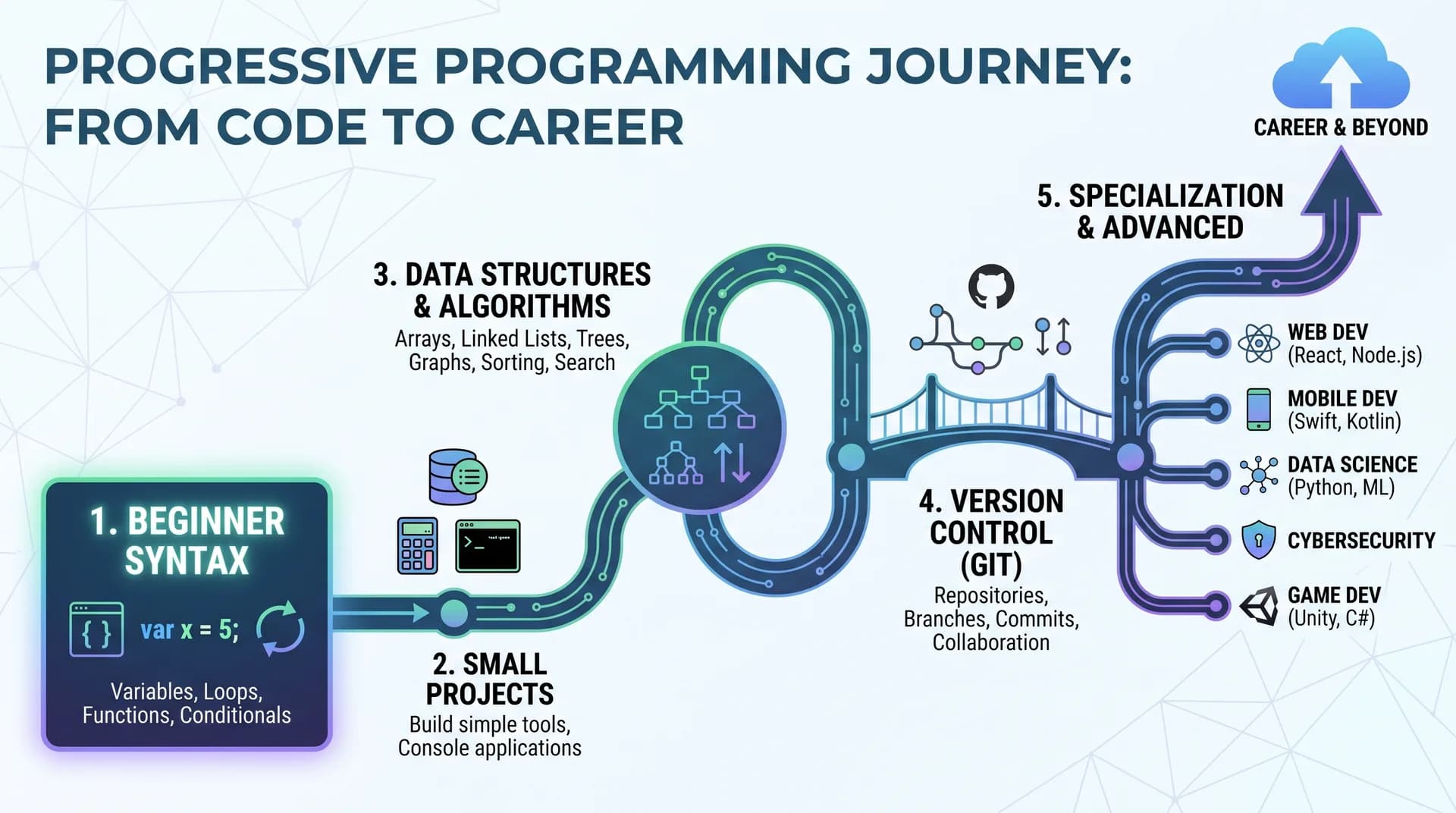
Stage 1: Choose a language
Python is often approachable for beginners because its syntax is relatively concise, while JavaScript is particularly relevant to web development.
The best starting language depends on your goals.
Stage 2: Learn core syntax
Study:
- Variables
- Data types
- Operators
- Conditions
- Loops
- Functions
Stage 3: Practice problem solving
Solve small problems without immediately looking for complete solutions.
Stage 4: Learn data structures
Study appropriate uses of:
- Arrays/lists
- Stacks
- Queues
- Sets
- Maps
- Trees
- Graphs
You don't need to become proficient in all the advanced structures on the first day.
Stage 5: Learn algorithms
Start with basic techniques for searching, sorting, traversing, and solving problems.
Then find out how to think about efficiency.
Stage 6: Learn version control
Tools like Git help developers track changes to source code and work with others.
Stage 7: Build projects
Projects provide theoretical knowledge with practical experience.
Stage 8: Read other people's code
Studying well-structured code helps you pick up patterns that tutorials alone might not show.
Stage 9: Learn your chosen specialisation
After learning the fundamentals, you can move toward areas such as:
- Web development
- Mobile development
- Data science
- Machine learning
- Game development
- Cybersecurity
- Cloud engineering
- Automation
- Systems programming
The basic principles still apply to all of these approaches.
A Simple Example That Combines Programming Fundamentals
Let us consider a program which checks whether a user is allowed to access a certain feature.
It might need:
- A variable that stores the user's age.
- A Boolean value that represents the account status.
- An if statement.
- A logical operator.
- A function that contains the logic for making the decision.
For example:
def can_access(age, active_account):
if age >= 18 and active_account:
return True
return False
This brief example illustrates a number of basic ideas simultaneously.
The function takes inputs, assesses a condition, and then returns a result.
You could extend the program by including more rules, tests, error handling, and user input.
This illustrates an important principle:
Complex software is usually put together by combining a number of simple programming concepts.
FAQs
1. What are the fundamentals of programming?
The fundamentals are variables, data types, operators, input and output, conditional statements, loops, functions, data structures, algorithms, debugging, and problem-solving.
As they progress, beginners should also learn to read documentation, test programs, and make use of version-control tools.
2. Which should I study first in the field of programming?
Begin by studying one programming language and pick up the ideas concerning variables, data types, operators, conditions, loops, and functions. After that, apply these concepts by working on small projects.
Once you are confident with the basics, move on to data structures, algorithms, testing, debugging, version control, and specialise in a particular area.
3. Is programming difficult for people who are just starting?
At first, programming can seem difficult because you are learning not only a new language but also a different way of thinking about problems.
It is generally easier to handle the difficulty if you break the problem into small steps and practice regularly.
There is no necessity to use advanced mathematics if you want to start learning several subjects in programming.
4. What programming language is most suitable for beginners?
No single language is best for every beginner.
Python is frequently used for teaching programming, automation, data processing, and many other areas. JavaScript is especially useful when developing websites. For certain objectives, other languages might be more suitable.
Select a language according to the type of application you want to develop and the ecosystem you wish to join.
5. What is the time required to learn the basics of programming?
It all comes down to your experience, how much time you have to study, the learning method you adopt, and your own idea of what it means to 'learn'.
You can grasp the basic concepts quickly, but it takes ongoing practice to develop reliable problem-solving skills.
It is better to see programming as a skill which develops step by step rather than as a subject that you can finish.
6. Should I learn programming before learning frameworks?
Usually, learning basic programming concepts first makes frameworks easier to understand.
For instance, someone who understands functions, variables, objects, modules, and asynchronous concepts usually has a stronger foundation for learning a framework that uses those concepts.
Framework knowledge should supplement programming fundamentals, not replace them.
7. Is it necessary for me to study mathematics to become a programmer?
The amount of mathematics needed varies by programming field.
Many beginner programming tasks require basic arithmetic and logical reasoning, not advanced mathematics. Specialised fields such as machine learning, graphics, scientific computing, and some engineering disciplines can require substantially more mathematics.
8. How can I practice programming effectively?
Write code regularly and build small projects.
Instead of only watching tutorials, solve problems yourself, test your programs, deliberately introduce changes, read error messages, and debug your code.
Gradually increase project complexity as your understanding improves.
Conclusion
Programming fundamentals form the foundation of software development.
Variables let programs work with information. Data types describe that information. Operators perform calculations and comparisons. Conditions allow decisions. Loops provide repetition. Functions organise reusable logic. Data structures organise information, while algorithms provide systematic approaches to solving problems.
Just as importantly, programming fundamentals teach you how to think through problems.
You do not need to know every programming language, framework, or tool before building useful software. Start with one language, understand the core concepts, practice through small projects, learn from errors, and gradually increase the complexity of your work.
The most valuable skill is not memorising code. It is learning how to take a problem, break it into manageable pieces, design a solution, implement it, test it, and improve it.
That foundation can continue supporting your learning, whether you eventually become a web developer, mobile developer, data professional, game developer, automation engineer, or another type of software developer.