JavaScript Fundamentals for Beginners
JavaScript is one of the key programming languages used in today's web development, enabling webpages to become interactive, to process data, to respond to user actions, to communicate with APIs, and to drive applications that go well beyond a basic webpage.
JavaScript may at first seem like a bunch of mysterious punctuation that has been invented solely to make new programmers question their life decisions if they're completely new to programming. The good thing is that the basic concepts are far more straightforward than the whole ecosystem leads one to believe.
The guide discusses the JavaScript fundamentals that you need to know before going on to frameworks like React, Next.js, Vue, or Node.js.
What Is JavaScript?
JavaScript is a programming language of a general kind which is frequently used to give websites and applications behaviour and interactivity.
In a typical webpage:
- HTML provides structure.
- CSS is in charge of presentation and layout.
- JavaScript includes the behavior and logic.
For example, HTML can create a button:
JavaScript can make that button respond to a click:
const button = document.querySelector("#helloButton");
button.addEventListener("click", () => {
alert("Hello, JavaScript!");
});
The browser offers JavaScript APIs which enable the code to interact with the webpage, such as the DOM and browser events. JavaScript is also used in situations outside of browsers, for example on the server side and in other application environments. MDN Web Docs
JavaScript is itself defined as ECMAScript, the ECMAScript specification setting out the core language, while environments such as browsers offer further APIs and capabilities. TC39
How Does JavaScript Work?
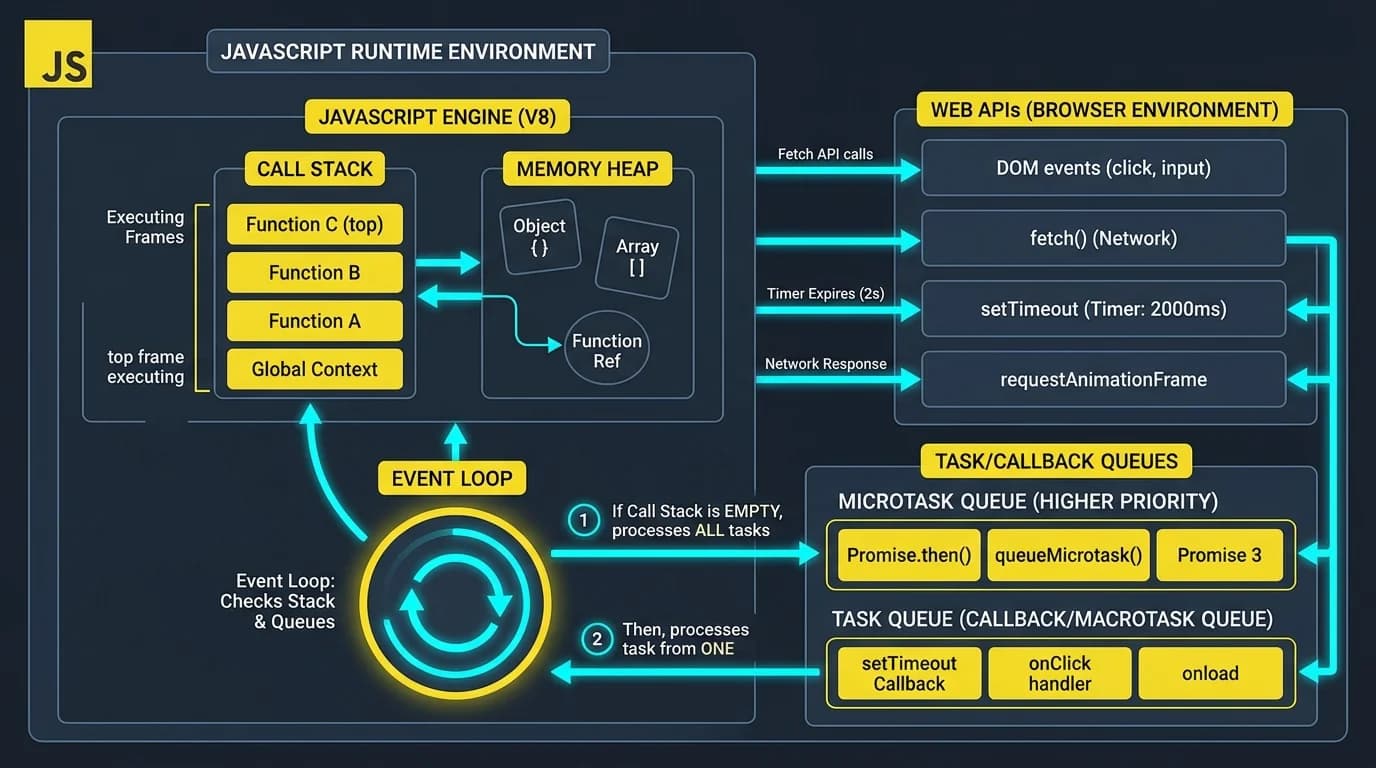
A JavaScript engine accepts JavaScript source code and carries it out.
The JavaScript engine which is included in modern browsers is responsible for processing your code, although different environments make use of different engines, the language itself adheres to the ECMAScript specification.
It helps to distinguish between JavaScript as a language and the environment it runs in.
For example:
const name = "Alex";
console.log(name);
The language defines things such as:
- variables
- functions
- objects
- arrays
- operators
- classes
- promises
The environment can also provide extra functionality.
A browser can provide:
- DOM APIs
- browser events
- fetch()
- Web Storage
- timers
- Web APIs
Node.js offers a different set of runtime features, for example those related to the filesystem and serving.
According to MDN Web Docs, this distinction becomes more important the further you go beyond beginner JavaScript.
Setting Up JavaScript
There is no need to use a complicated development environment if you want to start learning JavaScript.
MDN Web Docs states that a modern web browser includes developer tools and a JavaScript console that let you experiment with code.
For example, open your browser's developer tools and run:
console.log("Hello, World!");
You should see:
Hello, World!
For serious development, you will eventually want:
- A code editor
- A modern browser
- A project folder
- An HTML file
- A JavaScript file
A simple project might look like this:
my-project/
├── index.html
└── script.js
Then connect JavaScript to HTML:
JavaScript modules offer a neater way to organize code into separate files for larger projects. Modern browsers support JavaScript modules natively. MDN Web Docs
JavaScript Syntax
JavaScript syntax is defined by how you write instructions.
A simple statement looks like this:
const message = "Hello!";
JavaScript is generally case-sensitive:
const name = "Alex";
const Name = "John";
These are different identifiers.
Comments can explain code without being executed:
// This is a single-line comment
/*
This is a
multi-line comment
*/
Good comments should give a reason for why a particular action is being taken rather than simply restating what the code clearly indicates.
Variables in JavaScript
You can use variables to store and work with values.
Modern JavaScript primarily uses:
- const
- let
var, which is older and has different scoping behavior.
const
Variables declared with const cannot be reassigned once set, making your code predictable and safe from unintended mutations:
// Constant variable declaration
const PI = 3.14159;
const MAX_SCORE = 100;

// Objects declared with const cannot be reassigned, but properties can be mutated:
const userProfile = {
  username: "code_ninja",
  completedQuizzes: 12
};

userProfile.completedQuizzes += 1; // Valid mutation
console.log(userProfile.completedQuizzes); // 13
Use the const keyword when you have no intention of reassigning the variable.
const name = "Alex";
const age = 21;
You cannot do this:
const age = 21;
age = 22;
However, the const declaration does not make objects or arrays completely immutable since it only prevents the variable itself from being reassigned. MDN Web Docs
let
The let keyword allows you to declare reassignable, block-scoped variables that only exist within their surrounding curly braces {}:
let userPoints = 0;
userPoints += 25;
console.log(`Points: ${userPoints}`); // Points: 25

// Block scope demonstration
if (userPoints > 20) {
  let badge = "Silver Master";
  console.log(`Unlocked badge: ${badge}`);
}
// console.log(badge); // ReferenceError: badge is not defined outside the block
You should use let when the variable is going to be reassigned.
let score = 10;
score = 20;
What about var?
You may encounter:
var name = "Alex";
JavaScript includes var, but modern code tends to use let and const because they offer block-level scoping and make variable behavior easier to understand.
A useful beginner rule is:
Begin with const and use let only when reassignment is actually needed.
JavaScript Data Types
JavaScript can be used with various types of values.
The primitive types include:
| String | "Hello" |
| Number | 42 |
| BigInt | 123n |
| Boolean | true |
| Undefined | undefined |
| Null | null |
| Symbol | Symbol("id") |
JavaScript includes objects, such as arrays, functions, maps, regular expressions, and other kinds of objects. MDN Web Docs
Strings
Strings represent textual data. Modern JavaScript supports template literals (backticks ``) for string interpolation:
const greeting = "Welcome to NeuraQuiz";
const learnerName = "Alex";

// Modern template literal with ${}
const message = `${greeting}, ${learnerName}! Ready for today's drill?`;
console.log(message);
console.log(message.length); // Character count
const name = "Alex";
Template literals are particularly useful:
const age = 21;
console.log(`I am ${age} years old.`);
Numbers
const price = 99.99;
const quantity = 3;
const total = price * quantity;
Booleans
const isLoggedIn = true;
const isAdmin = false;
Boolean values are frequently used in conditions.
Null and Undefined
let username;
console.log(username); // undefined
null generally represents an intentional absence of a value:
const selectedUser = null;
Understanding the difference between null and undefined becomes important as your applications grow more complex.
Operators in JavaScript
You can use operators to perform calculations, comparisons, assignments, and logical operations.
Arithmetic operators
const sum = 10 + 5;
const difference = 10 - 5;
const product = 10 * 5;
const division = 10 / 5;
Comparison operators
10 > 5
10 < 20
10 === 10
10 !== 5
Prefer strict equality:
5 === "5"; // false
rather than relying on loose equality:
5 == "5"; // true
This difference matters because JavaScript can perform type coercion.
Logical operators
const age = 25;
console.log(age >= 18 && age <= 60);
Common logical operators include:
- && AND
- || OR
- ! NOT
Conditional Statements
Programs often need to make decisions.
The most common structure is if:
const age = 20;
if (age >= 18) {
console.log("Adult");
} else {
console.log("Minor");
}
You can also use else if:
const score = 85;
if (score >= 90) {
console.log("Excellent");
} else if (score >= 75) {
console.log("Good");
} else {
console.log("Keep practicing");
}
JavaScript also includes a switch statement for handling multiple cases.
Loops in JavaScript
You can repeat operations using loops.
for loop
Standard for loops iterate through counts with an initializer, condition, and incrementor:
for (let i = 1; i <= 5; i++) {
  console.log(`Evaluating question #${i}...`);
}
for (let i = 0; i < 5; i++) {
console.log(i);
}
while loop
let count = 0;
while (count < 5) {
console.log(count);
count++;
}
for...of
This is particularly useful for iterating through iterable values such as arrays:
const languages = ["JavaScript", "Python", "Java"];
for (const language of languages) {
console.log(language);
}
JavaScript also includes the in operator, break, continue, and other iteration methods. MDN Web Docs
JavaScript Functions
Functions are reusable building blocks of logic. Modern JavaScript features both standard function declarations and arrow functions:
// 1. Classic Function Declaration
function calculateAccuracy(correctAnswers, totalQuestions) {
  if (totalQuestions === 0) return 0;
  return ((correctAnswers / totalQuestions) * 100).toFixed(1) + "%";
}

// 2. Modern ES6 Arrow Function
const calculateXP = (score, multiplier = 10) => score * multiplier;

console.log(calculateAccuracy(9, 10)); // "90.0%"
console.log(calculateXP(9));          // 90
Functions are blocks of code that can be reused.
function greet(name) {
return `Hello, ${name}!`;
}
console.log(greet("Alex"));
Here:
- greet is the function name.
- name is a parameter.
- return sends a value back to the caller.
Functions can also be stored in variables:
const add = (a, b) => {
return a + b;
};
console.log(add(5, 3));
This is called an arrow function.
JavaScript functions are first-class objects because you can assign them to variables, pass them as arguments to other functions, and return them from functions. MDN Web Docs says this feature is essential to modern JavaScript programming.
Arrays in JavaScript
Arrays hold ordered lists of values and include built-in iteration methods like .map(), .filter(), and .forEach():
const programmingTopics = ["JavaScript", "Python", "DevOps", "Cybersecurity"];

// Adding and inspecting elements
programmingTopics.push("Cloud Infrastructure");
console.log(`Total topics: ${programmingTopics.length}`);

// Modern array iteration
programmingTopics.forEach((topic, index) => {
  console.log(`${index + 1}. ${topic}`);
});

// Filtering items
const searchResults = programmingTopics.filter(t => t.includes("Script"));
console.log(searchResults); // ["JavaScript"]
Arrays are used to store collections of values in a specific order.
const fruits = ["Apple", "Banana", "Orange"];
You can access an element using its index:
console.log(fruits[0]);
The first item has the index zero.
Arrays have many useful methods:
fruits.push("Mango");
fruits.pop();
You will also frequently encounter:
map()
filter()
find()
reduce()
forEach()
For example:
const numbers = [1, 2, 3, 4];
const doubled = numbers.map(number => number * 2);
console.log(doubled);
Output:
[2, 4, 6, 8]
One of the most valuable things for a beginner to learn when moving to an intermediate level is array methods.
JavaScript Objects
You can use objects to collect related data and behavior.
const user = {
name: "Alex",
age: 25,
isAdmin: false
};
You can access properties using dot notation:
console.log(user.name);
Or bracket notation:
console.log(user["age"]);
Objects can contain functions as methods:
const user = {
name: "Alex",
greet() {
console.log(`Hello, ${this.name}`);
}
};
user.greet();
JavaScript centers around objects. Once you understand properties, methods, prototypes, and finally classes, you'll find it much easier to learn more advanced JavaScript. MDN Web Docs
DOM and JavaScript Events
A major application of JavaScript in the browser is for interacting with the Document Object Model (DOM).
The webpage is represented as a structure that JavaScript can interact with.
For example:
Hello
JavaScript can find that element:
const title = document.querySelector("#title");
Then change its content:
title.textContent = "Welcome!";
JavaScript can also respond to events:
const button = document.querySelector("#button");
button.addEventListener("click", () => {
console.log("Button clicked!");
});
This is the foundation of interactive web pages, including:
- menus
- forms
- buttons
- validation
- games
- calculators
- dashboards
- dynamic interfaces
The beginner section of MDN specifically treats DOM scripting and events as essential JavaScript fundamentals. MDN Web Docs
Asynchronous JavaScript
At some point you'll find that JavaScript is required if you want to carry out operations which do not finish immediately.
Examples include:
- fetching data from an API
- loading resources
- waiting for timers
- communicating with servers
Here's where promises and async/await come into their own.
A Promise is the final result of an asynchronous operation, according to MDN Web Docs.
For example:
async function getData() {
const response = await fetch("https://example.com/data.json");
const data = await response.json();
console.log(data);
}
Errors can be handled using try...catch:
async function getData() {
try {
const response = await fetch("https://example.com/data.json");
if (!response.ok) {
throw new Error("Request failed");
}
const data = await response.json();
console.log(data);
} catch (error) {
console.error(error);
}
}
async/await is built on top of promises and provides a more readable way to work with asynchronous operations. MDN Web Docs
JavaScript Modules
As applications grow, it becomes increasingly unpleasant to put all content into a single JavaScript file.
You can split functionality across different files using modules.
For example:
// math.js
export function add(a, b) {
return a + b;
}
Then import it:
import { add } from "./math.js";
console.log(add(5, 3));
Modules help developers:
- organize code
- avoid unnecessary global variables
- reuse functionality
- separate responsibilities
- maintain larger applications
MDN Web Docs states that modern browsers support JavaScript modules directly.
Common JavaScript Beginner Mistakes
You'll find learning JavaScript much easier if you know the mistakes beginning learners typically make.
1. Confusing = and ===
x = 10;
assigns a value.
x === 10;
checks strict equality.
2. Using var everywhere
Learn let and const first. They make modern JavaScript easier to reason about.
3. Ignoring errors
If your browser displays an error, then read it.
The error message is generally much more helpful than spending 40 minutes looking at your code and hoping that inspiration will come.
4. Attempting to learn a framework too early
Do not rush straight into React or another framework if you cannot comfortably explain:
- variables
- functions
- arrays
- objects
- conditions
- loops
- scope
- events
- promises
Framework syntax can't automatically replace JavaScript fundamentals.
5. Memorizing instead of building
Writing small programs is more effective than repeatedly watching tutorials.
Try building:
- a calculator
- a number guessing game
- a to-do list
- a stopwatch
- a quiz
- a weather application
- a simple expense tracker
MDN includes practical exercises in its JavaScript learning path. MDN Web Docs
A Practical JavaScript Learning Path
A sensible learning sequence is:
Step 1: Basic syntax
↓
Step 2: Variables and data types
↓
Step 3: Operators and expressions
↓
Step 4: Conditions
↓
Step 5: Loops
↓
Step 6: Functions
↓
Step 7: Arrays and array methods
↓
Step 8: Objects
↓
Step 9: DOM manipulation
↓
Step 10: Events
↓
Step 11: JSON and APIs
↓
Step 12: Promises and async/await
↓
Step 13: Modules
↓
Step 14: Error handling and debugging
↓
Step 15: Advanced JavaScript
↓
Step 16: Frameworks and runtimes
After you have got the basics under your belt, it is much easier to move on to React, Next.js, Node.js, TypeScript, or other JavaScript-based technologies.
MDN's fundamental course follows the same sequence, covering variables, text, arrays, conditions, loops, functions, objects, DOM scripting, events, asynchronous JavaScript, network requests, JSON, libraries and frameworks, and debugging. MDN Web Docs
What comes after JavaScript fundamentals?
Once you have mastered the basics, you can go in several directions.
Frontend development
Learn:
- HTML
- CSS
- JavaScript
- DOM
- APIs
- React
- Next.js
Backend development
Learn:
- Node.js
- HTTP
- REST APIs
- databases
- authentication
- security
Full-stack development
Integrate the frontend and backend technologies.
TypeScript
Once you know JavaScript, TypeScript becomes much easier because it builds on JavaScript and adds static typing.
Advanced JavaScript
Eventually explore:
- closures
- scope
- prototypes
- classes
- this
- destructuring
- spread/rest syntax
- higher-order functions
- event loop
- promises
- generators
- iterators
- modules
- memory management
MDN Web Docs also covers more advanced topics in its JavaScript Guide, including closures, inheritance, prototypes, memory management, iterators, generators, promises, and modules.
JavaScript Fundamentals FAQ
Is JavaScript easy for people who are just starting?
Although JavaScript is easy for beginners, it includes sophisticated concepts that take time to grasp. You should begin by learning about variables, data types, conditions, loops, functions, arrays, and objects before going on to asynchronous programming and the more advanced topics.
Is JavaScript the same as Java?
No, JavaScript and Java are different programming languages; although their names have a historical connection, they differ in syntax, ecosystems, runtimes, and design features.
Can you learn JavaScript without first knowing HTML and CSS?
Yes; however, a basic understanding of HTML and CSS is very useful if your goal is web development. JavaScript often deals with HTML elements and browser APIs.
What are the key JavaScript fundamentals?
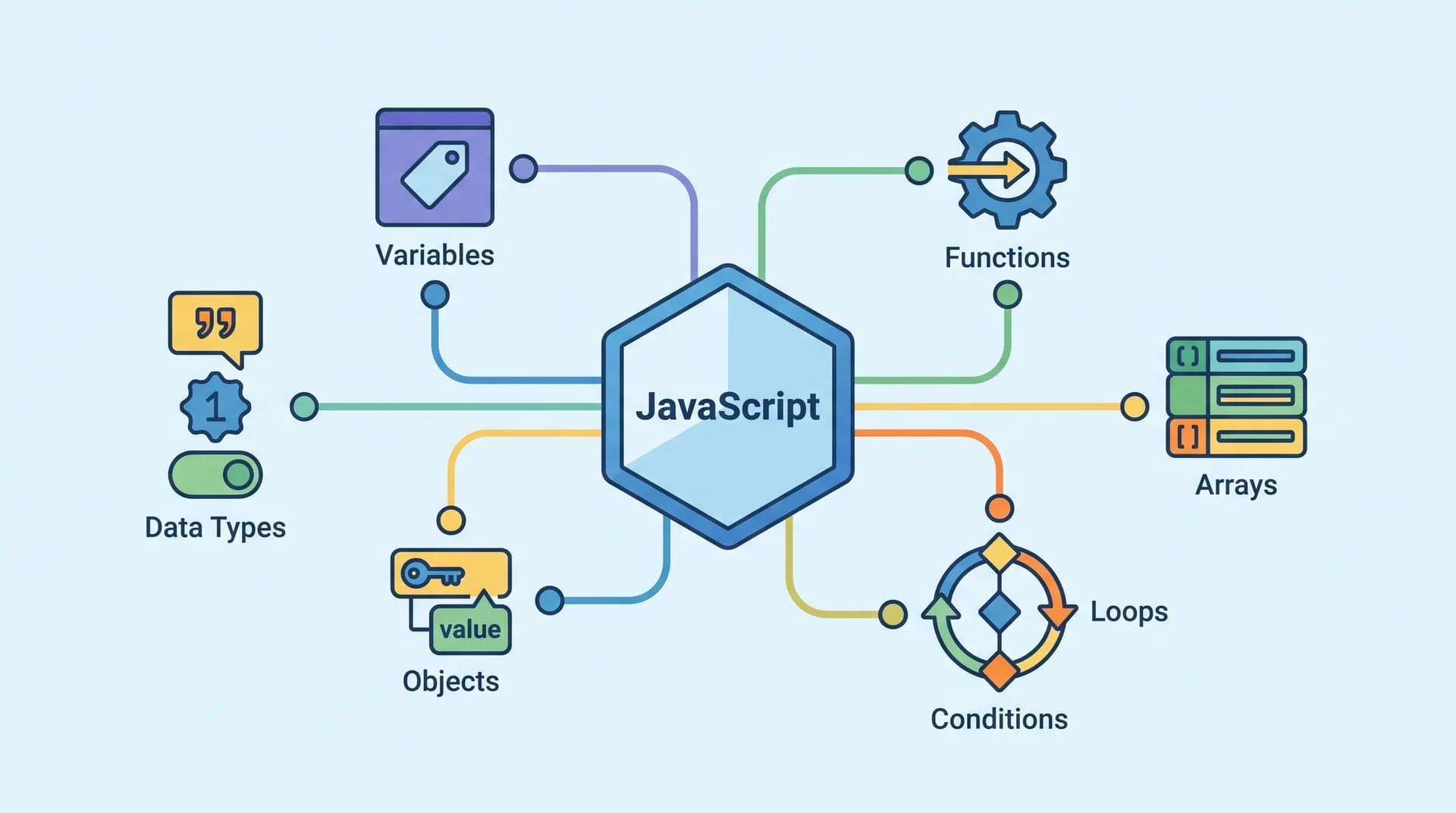
Key concepts include variables, data types, operators, conditions, loops, functions, arrays, objects, scope, DOM manipulation, events, promises, asynchronous programming, and modules.
What is the difference between let and const?
let allows a variable to be reassigned, while const does not allow reassignment. Both are block-scoped declarations. In modern JavaScript, use const by default and let when reassignment is necessary. MDN Web Docs
What does an array mean in JavaScript?
An array is a collection of values that are arranged in order. For example:
const languages = ["JavaScript", "Python", "Java"];
JavaScript offers many methods for searching, transforming, filtering, and processing data with arrays.
What counts as an object in JavaScript?
An object is made up of a number of related properties and functionalities. For example:
const person = {
name: "Alex",
age: 25
};
Objects are one of the fundamental building blocks of JavaScript applications according to MDN Web Docs.
What does async/await mean in JavaScript?
Async/await is syntax designed for working with asynchronous operations based on Promises, and it enables asynchronous code to be written in a form that is generally easier to read than using chained .then() calls. MDN Web Docs
Is JavaScript necessary before you learn React?
You can begin using React without mastering all JavaScript features, but a solid understanding of JavaScript makes it much easier to understand. Specifically useful are functions, arrays, objects, destructuring, modules, callbacks, and asynchronous programming.
How long will it take to learn JavaScript?
No single timeline applies to everyone. Although you can pick up the basic syntax fairly quickly, you still need continuous practice to become comfortable building real applications. Instead of focusing on a specific number of days, focus on building projects that get harder over time.
Conclusion
Learning the basics of JavaScript is one of the best things you can do if you want to become a web developer.
You don't need to know the whole language to write useful programs; instead, begin with the basic principles:
data types → variables → operators → conditions → loops → functions → arrays → objects → DOM → events → APIs → promises → modules.
Strengthen each concept by creating something.
JavaScript has long moved well beyond the original role of a browser script. It is now being standardized as a general-purpose language through ECMAScript, thanks to the various implementations and host environments which offer extra capabilities. TC39
What matters isn't remembering hundreds of different methods; it's learning to think in code by breaking a problem into smaller parts, representing information with suitable data structures, writing reusable logic, handling errors, and understanding how the parts of an application communicate.
Once those fundamentals become second nature, frameworks stop looking like mysterious collections of brackets and start looking like what they are: tools built on concepts you already understand. That's when JavaScript becomes considerably more fun. 🚀