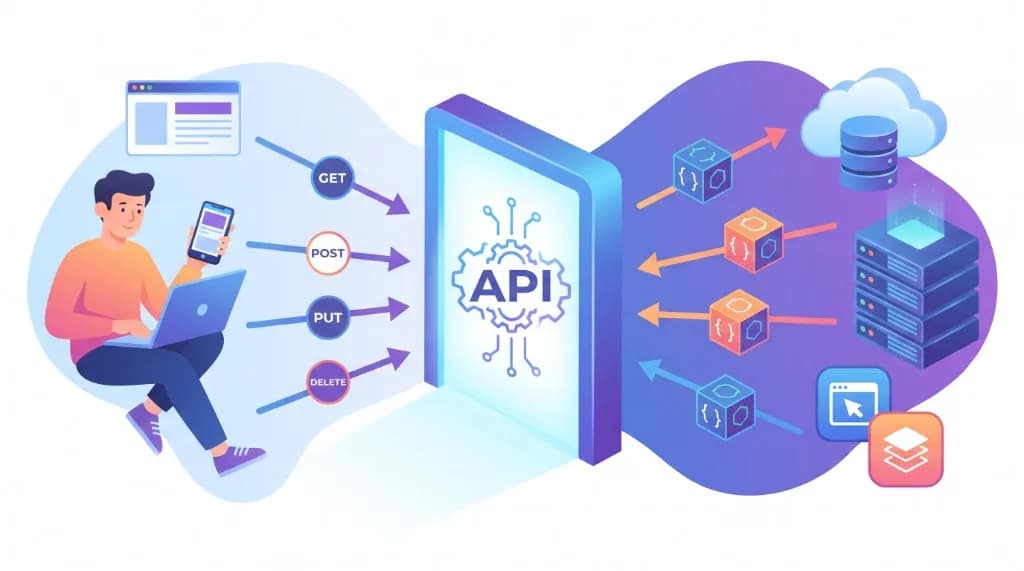
Modern applications rarely work in isolation. When you check a weather forecast, sign in with your Google account, complete an online payment, or browse products in a mobile app, separate software systems communicate behind the scenes in milliseconds.
One of the foundational technologies powering this communication is an API (Application Programming Interface).
APIs allow software applications to exchange data and invoke each other’s functionality without needing to know how the underlying systems are implemented. On the modern web, REST APIs are among the most widely used architectures—relying on standard HTTP methods and lightweight JSON payloads.
In this guide, you will learn what APIs are, how REST APIs work, what each HTTP method does, how JSON structures data, how HTTP requests and responses are built, and how to test and secure APIs in practice.
Your API & REST Learning Roadmap
Follow this progression to go from core concepts to testing and securing real-world endpoints:
Understand Client & Server
Master REST & Endpoints
Use HTTP Verbs & JSON
Test with cURL & Postman
Secure APIs in Production
1. What Is an API?
An API (Application Programming Interface) is a defined contract of rules, protocols, and data formats that enables different software applications to communicate with one another.
Acting as an intermediary between two systems, an API specifies what operations or data a client can request, how each request must be formatted, and what structure the response will follow.
Think of an API as a waiter in a restaurant:
- You (the customer) represent the client application requesting something.
- The waiter represents the API, taking your order and delivering it clearly.
- The kitchen represents the backend server and database that prepare the result.
- Your meal represents the requested data or confirmation returned to you.
You do not need to walk into the kitchen or know how the stoves work. You simply place a structured order through the waiter and receive your meal in return. Software APIs work the same way: a client sends a request through an API, the server processes it, and the API returns a predictable response.
Why Are APIs Important?
APIs make modern software development faster, cleaner, and far more scalable. Key benefits include:
- Integration: Connect your application with external services (maps, payments, authentication, email) instead of building everything from scratch.
- Automation: Allow systems to synchronize records, trigger webhooks, and execute workflows automatically without manual intervention.
- Reusability: Expose core business logic once so web apps, mobile apps, and partner services can all reuse the same backend capabilities.
- Scalability: Develop, deploy, and scale frontend interfaces and backend microservices independently.
- Interoperability: Enable applications written in completely different languages—such as Python, JavaScript, Go, Java, or Swift—to communicate reliably over standard web protocols.
For example, an e-commerce store can integrate Stripe or PayPal’s API to process credit card payments securely rather than building its own banking compliance infrastructure.
2. How Do APIs Work?
Most web APIs follow a client-server request-response model, often routed through an API gateway that handles routing, authentication, and rate limiting.
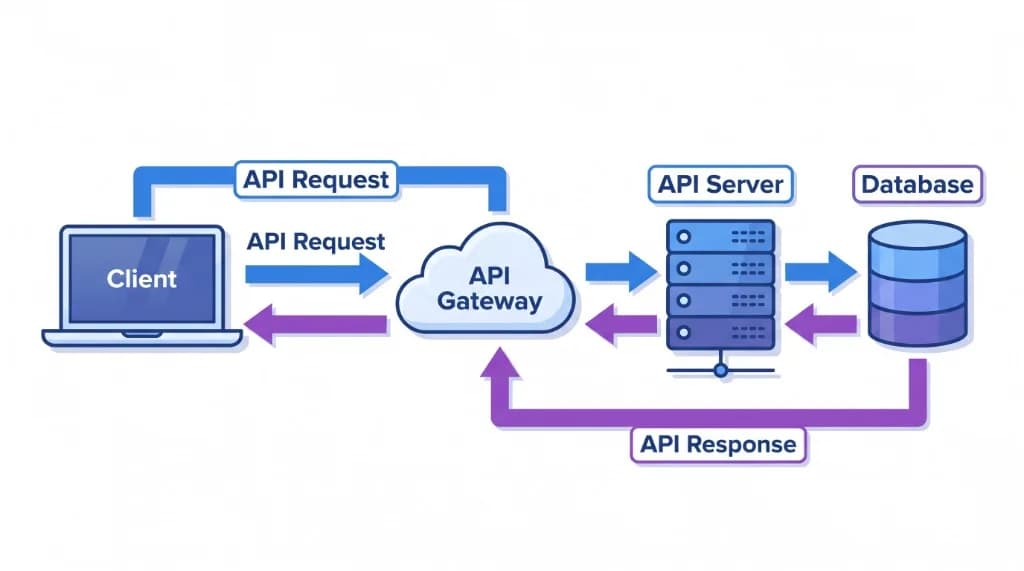
A typical API request lifecycle follows five steps:
- Client sends a request: A browser, mobile app, or backend service sends an HTTP request to a specific API endpoint URL.
- API gateway and server receive the request: The gateway or server inspects the URL path, HTTP method, headers, and authentication credentials.
- Server processes the request: The backend application executes business logic and reads from or writes to a database or downstream service.
- Server builds a response: The server formats the resulting data—or a clear error payload—alongside an HTTP status code.
- Client receives and uses the response: The client parses the returned data (usually JSON) and updates the user interface or application state.
For example, imagine a student management portal fetching details for student 101. The client sends:
GET https://api.example.com/students/101The server queries the database and responds with JSON data:
{
  "id": 101,
  "name": "John Smith",
  "course": "Information Technology",
  "year": 2
}
The frontend application can now render John’s profile cleanly without ever touching or exposing the server’s internal database.
3. Real-World Examples of APIs
APIs power nearly every digital product you interact with daily:
| Application | How APIs Are Used |
|---|---|
| Weather applications | Fetch live forecasts and radar alerts from meteorological services |
| Online shopping | Retrieve product catalogs, verify inventory, and process payments |
| Social media | Share posts, fetch feeds, and enable third-party OAuth logins |
| Google Maps | Embed interactive maps, geocoding, and turn-by-turn directions |
| Banking applications | Display account balances, transaction history, and fund transfers |
| Streaming services | Load video metadata, personalized recommendations, and playback URLs |
Consider what happens behind the scenes when you place a single order on an e-commerce site. Several specialized APIs collaborate in sequence:
- The Product API loads product titles, images, and pricing.
- The Inventory API checks real-time warehouse stock levels.
- The Payment API authorizes and captures the customer’s payment.
- The Order API persists the confirmed order record.
- The Notification API dispatches an email or SMS order confirmation.
Because each service communicates through a clean contract, teams can maintain and upgrade individual services without breaking the whole storefront.
4. What Is a REST API?
A REST API (or RESTful API) is a web API built around the architectural principles of REST (Representational State Transfer), introduced by computer scientist Roy Fielding in his 2000 doctoral dissertation.
REST APIs organize data into resources—entities such as users, products, students, or orders—and identify each resource with a clean URL path called an endpoint:
GET    /students
GET    /students/101
POST   /students
PUT    /students/101
DELETE /students/101
Each endpoint represents a resource, while the HTTP method specifies what action to perform on it, and JSON typically carries the data representation.
Important Principles of REST
REST architecture defines six core constraints:
1. Client-Server Architecture
The client and server have clearly separated concerns. The client manages user interfaces and display logic, while the server handles data storage, security, and business rules.
2. Statelessness
Every request from a client must contain all the context required for the server to understand and process it—the server does not store client session state between requests. For example, authenticated requests include a token in the Authorization header on every call.
3. Cacheability
API responses should declare whether clients or intermediaries may cache the returned data (using headers such as Cache-Control). Effective caching cuts latency and reduces unnecessary database queries.
4. Uniform Interface
Resources are accessed consistently through standard HTTP verbs, predictable URI paths, self-descriptive messages, and structured media types like application/json.
5. Layered System
A client cannot—and does not need to—tell whether it is talking directly to the origin server or communicating through intermediate layers such as load balancers, reverse proxies, CDNs, or API gateways.
6. Code on Demand (Optional)
Servers may optionally extend client functionality by transmitting executable code (such as JavaScript snippets). This is the only optional REST constraint.
Adhering to these principles produces APIs that are predictable, maintainable, and easier to scale.
5. Understanding HTTP Methods
HTTP methods—often called HTTP verbs—tell the server what operation the client wants to perform on a resource.
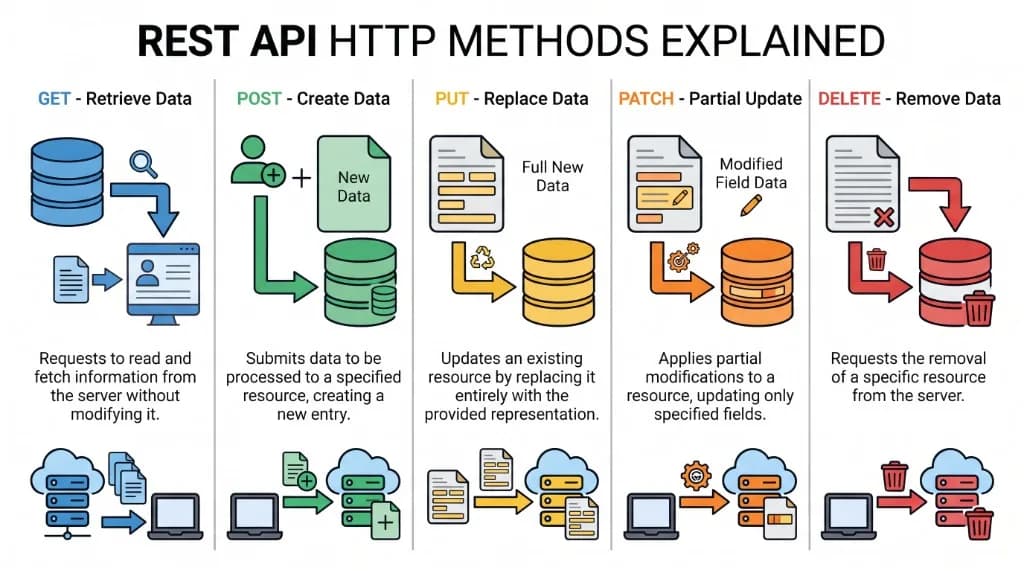
The five essential HTTP methods used in REST APIs are GET, POST, PUT, PATCH, and DELETE.
GET: Retrieve Data
The GET method requests a representation of a resource without modifying server state.
GET /studentsTo fetch a single student by ID:
GET /students/101GET requests are read-only and should never trigger side effects or alter records.
POST: Create or Submit Data
The POST method submits a payload to the server, most commonly to create a new resource inside a collection.
POST /students HTTP/1.1
Content-Type: application/json
Request body:
{
  "name": "Sarah",
  "course": "Computer Science",
  "year": 1
}
The server validates the payload, stores the new student record, and typically returns 201 Created along with the newly assigned ID.
PUT: Replace an Existing Resource
The PUT method replaces the entire representation of an existing resource with the supplied payload.
PUT /students/101 HTTP/1.1
Content-Type: application/json
Request body:
{
  "name": "Sarah",
  "course": "Information Technology",
  "year": 2
}
If fields are omitted in a PUT request, a strict REST implementation may overwrite them with default or null values because PUT represents a full replacement.
PATCH: Partially Update a Resource
The PATCH method applies a partial modification, updating only the specified fields.
PATCH /students/101 HTTP/1.1
Content-Type: application/json
Request body:
{
  "year": 3
}
Here, only the year field changes—name and course remain untouched.
DELETE: Remove a Resource
The DELETE method requests the removal of a specific resource from the server.
DELETE /students/101 HTTP/1.1Upon success, servers commonly return 204 No Content (an empty body) or 200 OK with a confirmation payload.
HTTP Methods Comparison
| Method | Purpose | Idempotent? | Example Action |
|---|---|---|---|
GET | Retrieve a resource or list | Yes | Fetch all students or student 101 |
POST | Create a new resource | No | Register a new student |
PUT | Replace an entire resource | Yes | Overwrite all details for student 101 |
PATCH | Partially update a resource | Depends on operation | Update only student 101’s year |
DELETE | Remove a resource | Yes | Delete student 101 |
PUT and PATCH, and what idempotency means. PUT replaces the entire resource while PATCH updates only specific fields. An HTTP method is idempotent if sending the identical request multiple times produces the same final resource state as sending it once (GET, PUT, and DELETE are idempotent; POST is not because repeating it can create duplicate records).6. What Is JSON?
JSON (JavaScript Object Notation) is a lightweight, text-based data-interchange format used to store and transmit structured information.
Although its syntax originated from JavaScript object literals, JSON is completely language-independent. Nearly every modern programming language—including Python, Java, PHP, C#, Go, Rust, and JavaScript—includes built-in or standard libraries to parse and serialize JSON.
JSON dominates REST API development because it is compact over the network, effortless for machines to parse, and easy for humans to read and debug.
Understanding JSON Structure
A JSON object stores structured data as key-value pairs enclosed in curly braces {}. Keys must always be double-quoted strings.
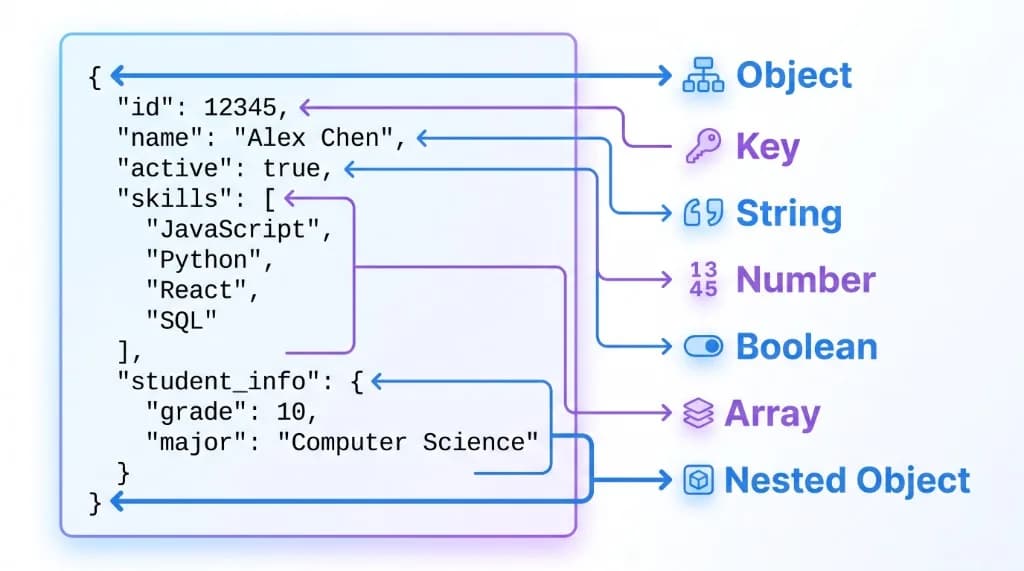
Here is a clean JSON object representing a student record:
{
  "id": 101,
  "name": "John",
  "isActive": true,
  "course": "Information Technology"
}
In this payload:
"id"maps to the numeric value101."name"maps to the string value"John"."isActive"maps to the Boolean valuetrue."course"maps to the string value"Information Technology".
JSON Data Types
JSON supports exactly six data types:
| Data Type | Example | Description |
|---|---|---|
| String | "John" | Text enclosed in double quotes |
| Number | 25 or 19.99 | Integer or floating-point number |
| Boolean | true or false | Logical truth value |
| Null | null | Represents an intentionally empty or absent value |
| Object | {"id": 1} | Unordered collection of key-value pairs inside {} |
| Array | [1, 2, 3] | Ordered list of values inside [] |
JSON also supports nested objects and arrays to model richer real-world entities:
{
  "student": {
    "id": 101,
    "name": "John"
  },
  "skills": [
    "Python",
    "JavaScript",
    "SQL"
  ]
}
Here, "student" holds a nested JSON object, while "skills" holds an array of strings.
JSON vs. XML
Before JSON became the standard for web APIs, XML (eXtensible Markup Language) was the primary data-exchange format. Both remain valid today, though each shines in different environments:
| Feature | JSON | XML |
|---|---|---|
| Structure | Key-value pairs and arrays | Opening/closing tags and attributes |
| Readability | Concise and easy to scan | More verbose |
| Payload size | Lightweight | Larger due to repeated closing tags |
| Typical usage | Modern REST APIs, mobile apps, config files | Legacy enterprise integrations, SOAP, document schemas |
| Native web support | Built directly into JavaScript (JSON.parse) | Requires an XML DOM parser |
Neither format is universally superior—JSON excels for fast web and mobile APIs, while XML remains common where strict schema validation (XSD) or document-centric markup is required.
7. Understanding HTTP Requests and Responses
HTTP (Hypertext Transfer Protocol) is the transport protocol underpinning RESTful communication. Every interaction consists of a client request and a server response.
HTTP Request Components
A standard HTTP request contains four parts:
- Request Method: Defines the intended action (
GET,POST,PUT,PATCH,DELETE). - URL or Endpoint: Identifies the host and target resource path.
- Headers: Key-value metadata describing content type, accepted formats, caching directives, and authorization tokens.
- Request Body (Optional): The data payload sent to the server, typically used with
POST,PUT, andPATCH.
Example HTTP request:
POST /api/students HTTP/1.1
Host: example.com
Content-Type: application/json
Authorization: Bearer YOUR_ACCESS_TOKEN

{
  "name": "David",
  "course": "Software Engineering"
}
Here, Content-Type: application/json tells the server how to parse the request body, while Authorization carries credentials proving the caller’s identity.
HTTP Response Components
An HTTP response returns three main elements:
- Status line: Includes the protocol version and numeric status code indicating success or failure.
- Response headers: Metadata such as
Content-Type,Cache-Control, and rate-limit counters. - Response body (Optional): The requested resource, newly created object, or structured error message.
Example HTTP response:
HTTP/1.1 201 Created
Content-Type: application/json

{
  "id": 102,
  "name": "David",
  "course": "Software Engineering"
}
The status code 201 Created confirms that the server successfully processed the request and created a new resource.
8. Common HTTP Status Codes
HTTP status codes provide standardized, three-digit signals explaining how the server handled a request. They fall into five ranges:
| Code Range | Category | Meaning |
|---|---|---|
| 1xx | Informational | Request received; processing continues |
| 2xx | Success | Request was received, understood, and accepted |
| 3xx | Redirection | Further client action is required to complete the request |
| 4xx | Client Error | The request contains bad syntax, invalid data, or lacks permission |
| 5xx | Server Error | The server failed while processing an apparently valid request |
Important Status Codes to Remember
| Status Code | Meaning | Common Scenario |
|---|---|---|
200 OK | Request succeeded | Resource retrieved or updated successfully |
201 Created | Resource created | New record inserted via POST |
204 No Content | Succeeded with empty body | Resource deleted cleanly via DELETE |
301 Moved Permanently | Permanent redirect | Endpoint or page URL moved permanently |
400 Bad Request | Invalid client input | Malformed JSON or missing required field |
401 Unauthorized | Missing or invalid authentication | Missing, expired, or invalid token |
403 Forbidden | Authenticated, but not permitted | User lacks the role or permission required |
404 Not Found | Resource does not exist | Unknown endpoint or invalid ID (/students/999) |
405 Method Not Allowed | Verb not supported | Sending DELETE to a read-only endpoint |
429 Too Many Requests | Rate limit exceeded | Client sent too many requests too quickly |
500 Internal Server Error | Unexpected server failure | Unhandled backend exception or crash |
503 Service Unavailable | Server temporarily unreachable | Planned maintenance or traffic overload |
401 Unauthorized actually means unauthenticated—the server does not know who you are because credentials are missing or invalid. 403 Forbidden means the server knows who you are, but your account does not have permission to access that resource.9. How to Test an API
Before writing frontend code or mobile screens, developers inspect and verify API endpoints directly using dedicated testing tools:
- Postman: A feature-rich desktop and web workspace for organizing collections, testing endpoints, and automating API checks.
- Insomnia: A clean, fast API client popular for REST and GraphQL debugging.
- cURL: A lightweight command-line utility available on macOS, Linux, and Windows for sending HTTP requests directly from your terminal.
- Browser Developer Tools: The Network tab in Chrome or Firefox lets you inspect real HTTP headers, status codes, timings, and JSON payloads sent by any web page.
Example: Testing an API with cURL
You can query a public testing API like JSONPlaceholder right from your terminal:
curl https://jsonplaceholder.typicode.com/posts/1You can also specify the HTTP method explicitly with -X:
curl -X GET https://jsonplaceholder.typicode.com/posts/1To send JSON data with a POST request, set the Content-Type header and pass the payload using -d:
curl -X POST https://jsonplaceholder.typicode.com/posts \
  -H "Content-Type: application/json" \
  -d '{"title":"Learning APIs","body":"Understanding REST","userId":1}'
Example: Calling a REST API with JavaScript fetch()
In frontend web applications, you typically call APIs programmatically using JavaScript’s built-in fetch() API (if you are new to JavaScript syntax and async/await, check out our JavaScript Fundamentals Guide):
async function createPost() {
  const response = await fetch('https://jsonplaceholder.typicode.com/posts', {
    method: 'POST',
    headers: {
      'Content-Type': 'application/json',
    },
    body: JSON.stringify({
      title: 'Learning APIs',
      body: 'Understanding REST',
      userId: 1,
    }),
  });

  if (!response.ok) {
    throw new Error(`HTTP error! Status: ${response.status}`);
  }

  const data = await response.json();
  console.log('Created post:', data);
}

createPost();
Testing endpoints with cURL and fetch() quickly builds intuition for how HTTP methods, headers, status codes, and JSON payloads fit together.
10. API Security and Best Practices
Because APIs frequently expose user profiles, financial data, and critical business operations, security must be built in from day one:
- Always use HTTPS: Encrypt all traffic with TLS so passwords, tokens, and user data cannot be intercepted or tampered with in transit.
- Implement robust authentication: Verify caller identity using secure mechanisms such as OAuth 2.0, short-lived JWT access tokens, or server-side API keys.
- Enforce authorization on every endpoint: Never rely solely on client-side checks—verify that the authenticated user actually owns or has permission to access the requested resource (preventing Broken Object Level Authorization).
- Validate and sanitize input: Strictly validate request bodies, query parameters, and headers on the server to prevent injection attacks and malformed data bugs.
- Apply rate limiting and throttling: Cap requests per IP or user token to defend against brute-force logins, scraping, and denial-of-service spikes.
- Protect secrets and credentials: Store API keys and database credentials in environment variables (
.env) and exclude them via.gitignore—for safe repository hygiene, read our Git and GitHub Basics Guide. - Return safe error messages: Respond with clear status codes and helpful messages without leaking stack traces, SQL queries, or internal server paths.
11. API vs. REST API vs. Web Service
Developers often use these three terms interchangeably, even though they have distinct meanings:
| Term | Meaning |
|---|---|
| API | Any interface enabling software components to communicate (web, OS, library, or hardware) |
| REST API | A specific type of web API following REST architectural constraints over HTTP |
| Web Service | A software service exposed over a network using web protocols (HTTP, XML, JSON) |
In short, API is the broadest umbrella, web services are APIs accessible over a network, and REST is one popular architectural style for designing web APIs.
Other widely adopted API paradigms include:
- GraphQL: Allows clients to query a single endpoint and request the exact fields they need, preventing over-fetching.
- gRPC: A high-performance binary protocol built on HTTP/2 and Protocol Buffers, ideal for internal microservice communication.
- SOAP: An older, XML-based protocol with strict enterprise messaging contracts.
Frequently Asked Questions (FAQs)
1. What does API stand for?
API stands for Application Programming Interface. It is a set of rules and definitions that allows separate software applications or components to communicate and exchange data reliably.
2. What is a REST API in simple terms?
A REST API is a web interface designed around REST architectural principles. It exposes resources through clean URLs and uses standard HTTP methods (GET, POST, PUT, PATCH, DELETE)—usually exchanging data in JSON format.
3. What is the difference between an API and a REST API?
An API is a general concept covering any software-to-software interface (including browser APIs, operating system APIs, and database drivers). A REST API is a specific kind of web API that follows REST constraints. Every REST API is an API, but not every API is RESTful.
4. Why is JSON used in REST APIs?
JSON is compact, human-readable, quick to parse, and natively supported across virtually all programming languages. Its key-value structure maps naturally to objects, dictionaries, and arrays in application code.
5. What are the five main HTTP methods?
The five core HTTP methods in REST APIs are GET (retrieve), POST (create), PUT (full replace), PATCH (partial update), and DELETE (remove).
6. What is the difference between PUT and PATCH?
PUT replaces an entire resource with the complete payload you send, whereas PATCH updates only the specific fields included in the request body. Use PATCH when modifying a single property like a user’s email or status.
7. What is an API endpoint?
An API endpoint is the specific URL path where a client accesses a resource or action—for example, https://api.example.com/students/101.
8. Is JSON a programming language?
No. JSON is purely a data-interchange format. It represents structured values (strings, numbers, Booleans, arrays, objects, and null), and contains no logic, loops, variables, or functions.
9. What is the difference between HTTP and HTTPS?
HTTP transmits requests and responses in plain text, making data vulnerable to interception on public networks. HTTPS wraps HTTP inside TLS encryption, verifying the server’s identity and protecting data in transit.
10. Which tools can beginners use to test APIs?
Beginners can start with Postman or Insomnia for visual request building, cURL for fast terminal testing, and Browser Developer Tools (Network tab) to inspect live requests made by websites.
Conclusion
APIs are the connective tissue of modern software. They allow applications to share data, integrate third-party capabilities, and scale cleanly without exposing internal implementation details.
Mastering REST principles, HTTP methods, JSON syntax, request/response headers, and status codes gives you a rock-solid foundation for backend engineering, frontend integration, mobile development, and cloud architecture. Start by sending simple GET and POST requests to a public API with cURL or Postman, inspect the JSON responses, and then build your own endpoints.
Test Your API, REST & HTTP Knowledge
Put what you just learned into practice with these interactive quizzes on NeuraQuiz: