What Is SQL?
SQL (Structured Query Language) is the standard language for talking to relational databases. It's the language you use to create databases, store data, retrieve records, update records, and so on. It lets you create the database structure and then manipulate the data within it.
Almost every modern application needs a way to store and retrieve information. For example:
- An e-commerce website stores customer details and product information.
- A banking application manages accounts and transactions.
- A university system stores student records and examination results.
- A social media platform manages user profiles, posts, and comments.
- A quiz application stores questions, answers, and user results.
SQL provides a structured way of working with that information.
For example, imagine you want to retrieve all customers from a database. You could write:
SELECT * FROM customers;This query asks the database to return all the columns from the customers table.
SQL is a declarative language. You describe what you want, and the DBMS works out how to get it.
What Is a Database?
A database is an organized collection of data that can be stored, accessed, managed, and updated electronically.
Rather than storing information in separate text files or spreadsheets, databases provide a more structured way to hold large quantities of data.
Consider an online shopping application. It might store customer information in a table like this:
| customer_id | name | country | |
|---|---|---|---|
| 1 | John | [email protected] | USA |
| 2 | Sarah | [email protected] | UK |
| 3 | David | [email protected] | Canada |
This data is stored in a database table called customers. A database can contain many tables, each one being responsible for storing a particular type of information.
Database vs. DBMS
These two terms are related but have distinct meanings:
- Database: An organized collection of stored information.
- A DBMS (Database Management System) is software used to create, manage, and interact with databases.
A DBMS provides facilities for data storage, querying, access control, backup, and recovery. Examples are MySQL, PostgreSQL, Microsoft SQL Server, and Oracle Database.
How do relational databases work?
Relational databases store structured data across tables linked together through primary and foreign key relationships.
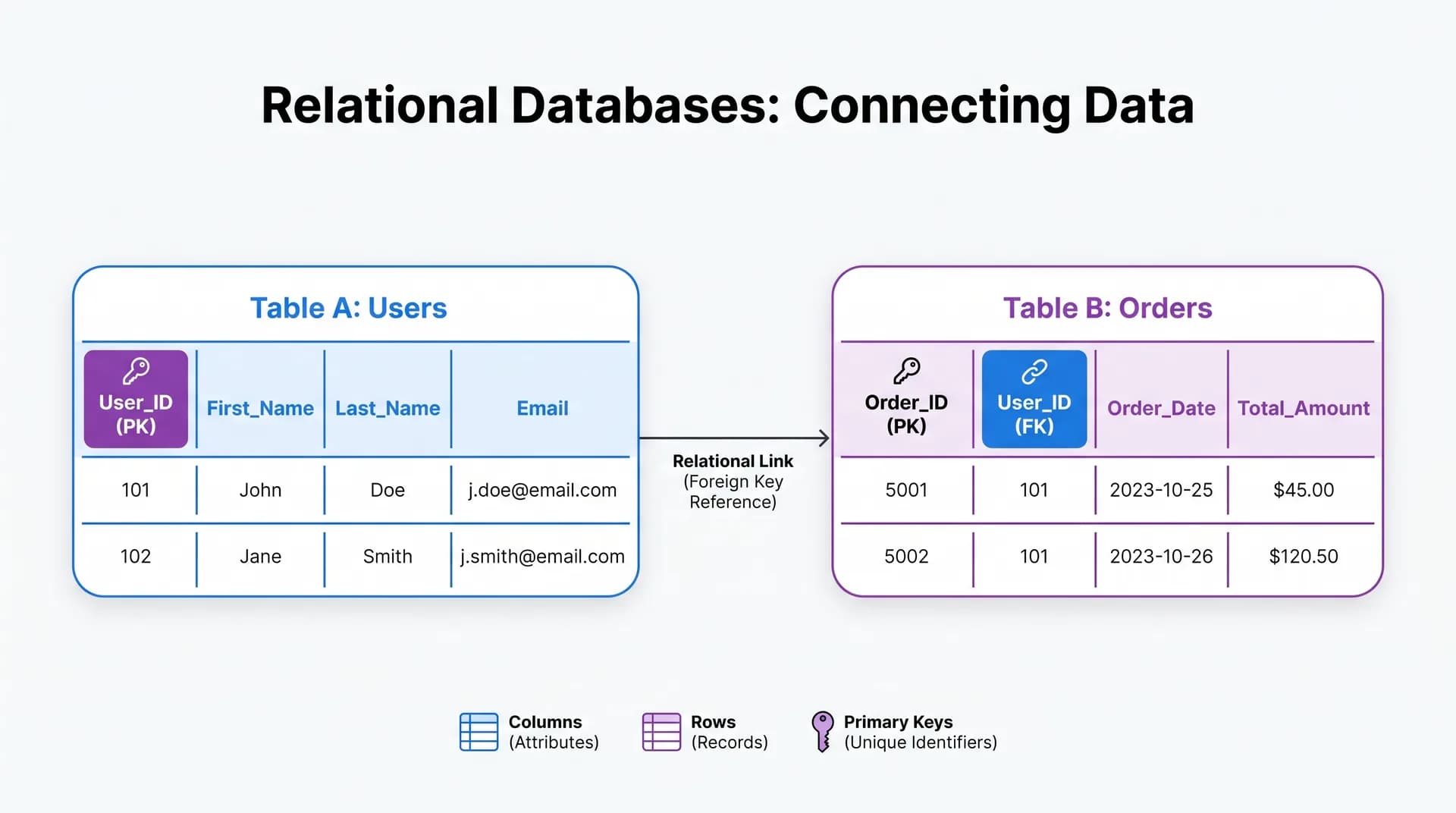
Understanding four fundamental concepts will make SQL much easier:
1. Tables
A table is a structure that holds related information in rows and columns. A students table is one example.
2. Rows
A row is one individual record in a table. So one row might contain all the details of a particular student.
3. Columns
A column represents a particular attribute of the stored information. Examples include:
- Student ID
- Student name
- Email address
- Age
- Registration date
4. Relationships
Relationships link related records in different tables.
For example, an online shopping database might have two tables:
Customers Table
| customer_id | name |
|---|---|
| 1 | John |
| 2 | Sarah |
Orders Table
| order_id | customer_id | amount |
|---|---|---|
| 101 | 1 | 250 |
| 102 | 1 | 150 |
| 103 | 2 | 300 |
Here, customer_id links the orders to the relevant customers. This lets you retrieve customer info alongside orders without duplicating customer details.
Popular SQL Database Management Systems
Several DBMSs support SQL. The underlying concepts are the same; the features and syntax can vary.
PostgreSQL
An open-source relational database, known for robust SQL support, reliability, and a strong feature set. It's one of the databases you'll find in pretty much every modern web app and back end.
- Website: PostgreSQL
MySQL
A widely used relational database system, found in many websites, content management systems, and more.
- Website: MySQL
Microsoft SQL Server
A relational database management system from Microsoft, used extensively in enterprise and corporate environments.
- Website: Microsoft SQL Server
Oracle Database
An enterprise database platform for complex business applications, high-volume transaction processing, and large-scale data management.
- Website: Oracle Database
SQLite
A lightweight serverless SQL database engine that stores the entire database in a single disk file. Very commonly used in mobile apps and embedded systems.
- Website: SQLite
SQL vs MySQL: What's the difference?
This is a fairly common question amongst the novices.
SQL is the language used to talk to relational databases; MySQL is the database management system that uses SQL. SQL is the language; MySQL is the software that speaks it.
| Feature | SQL | MySQL |
|---|---|---|
| Type | Query language | Database Management System (DBMS) |
| Purpose | Communicates with databases | Stores and manages data |
| Example | SELECT, INSERT | MySQL Server |
| Usage | Database operations | Database administration & management |
Other DBMSs (PostgreSQL and SQL Server) also support SQL, each with their own extensions and idiosyncrasies.
SQL Data Types
Every database column has a data type which defines the kind of data it can hold. Choosing the right data types is important for maintaining data integrity and storage efficiency.
Here are some common SQL data types:
| Data Type | Description | Example |
|---|---|---|
INT | Whole numbers | 100 |
DECIMAL | Exact decimal values | 199.99 |
VARCHAR | Variable-length text | 'John' |
CHAR | Fixed-length text | 'AB12' |
DATE | Calendar dates | '2026-11-11' |
TIME | Time values | '09:30:00' |
BOOLEAN | True or false values | TRUE |
TEXT | Longer text strings | Article content |
The exact range of available types and their behavior vary by database system. For example, a customer table might use an INT for the ID, a VARCHAR for the name, and a DATE for the registration date.
Understanding Basic SQL Commands
SQL commands are commonly grouped according to their purpose:
| Category | Full Name | Purpose |
|---|---|---|
| DDL | Data Definition Language | Defines database structures |
| DML | Data Manipulation Language | Inserts and modifies data |
| DQL | Data Query Language | Retrieves data |
| DCL | Data Control Language | Controls user permissions |
| TCL | Transaction Control Language | Manages database transactions |
Common commands include:
- CREATE: Creates database objects
- ALTER: Modifies database structures
- DROP: Removes database objects
- INSERT: Adds new records
- SELECT: Retrieves records
- UPDATE: Modifies existing records
- DELETE: Removes records
- GRANT: Assigns permissions
- REVOKE: Removes permissions
- COMMIT: Saves a transaction
- ROLLBACK: Reverses uncommitted changes
These commands form the basis of day-to-day SQL development.
How to Create a Database and Table
Let's go through SQL with a practical example. Suppose you're building a student management system and you need a database to hold student data.
Step 1Create a database
CREATE DATABASE university;This creates a database called university.
Step 2Select the database
In MySQL, select the active database with:
USE university;Step 3Create a table
CREATE TABLE students (
    student_id INT PRIMARY KEY,
    name VARCHAR(100),
    email VARCHAR(150),
    age INT,
    course VARCHAR(100)
);
This creates a table called students with five columns. It has a PRIMARY KEY constraint, which means each student record has a unique key and the key cannot be NULL.
Step 4View the table structure
In MySQL, you can view the schema by running:
DESCRIBE students;This shows the table's columns and their data types.
How to Insert Data Using SQL
The INSERT INTO statement inserts new records into a database table.
For example:
INSERT INTO students (student_id, name, email, age, course)
VALUES (1, 'John', '[email protected]', 21, 'Computer Science');
To insert multiple records in a single statement:
INSERT INTO students (student_id, name, email, age, course)
VALUES
    (2, 'Sarah', '[email protected]', 22, 'Information Technology'),
    (3, 'David', '[email protected]', 20, 'Software Engineering'),
    (4, 'Emma', '[email protected]', 23, 'Computer Science');
This statement inserts three additional student records.
How to Retrieve Data Using SELECT
The SELECT statement is one of the most fundamental SQL statements, as it's used to retrieve data from database tables.
Retrieve all records:
SELECT * FROM students;The asterisk (*) indicates that all columns should be returned.
Retrieve specific columns:
SELECT name, course
FROM students;
This query returns the student names and their courses.
Retrieve a single student:
SELECT *
FROM students
WHERE student_id = 1;
The WHERE clause filters the records based on a condition.
Remove duplicate results:
SELECT DISTINCT course
FROM students;
This returns each unique course name once.
Filtering and Sorting Data
SQL has some operators that can be used to filter the records returned by a query and to sort the results.
WHERE
The WHERE clause retrieves records that match specific criteria:
SELECT *
FROM students
WHERE age > 20;
This returns students older than 20.
AND and OR
These are the logical operators that combine multiple conditions.
Using AND:
SELECT *
FROM students
WHERE age > 20 AND course = 'Computer Science';
This query returns only the students who satisfy both conditions.
Using OR:
SELECT *
FROM students
WHERE course = 'Computer Science'
   OR course = 'Information Technology';
This returns students enrolled in either course.
ORDER BY
The ORDER BY clause sorts the result set:
SELECT *
FROM students
ORDER BY age ASC;
ASC for ascending order (which is the default), DESC for descending order.
LIMIT
In MySQL and PostgreSQL, LIMIT restricts the number of returned rows:
SELECT *
FROM students
LIMIT 5;
This returns up to 5 records. Other database systems may use a different syntax (e.g., TOP in SQL Server, FETCH FIRST in Oracle).
Understanding SQL JOINs
One of the most important SQL skills is retrieving related data from multiple tables. The JOIN clause is used to combine records from two or more tables based on a related column.
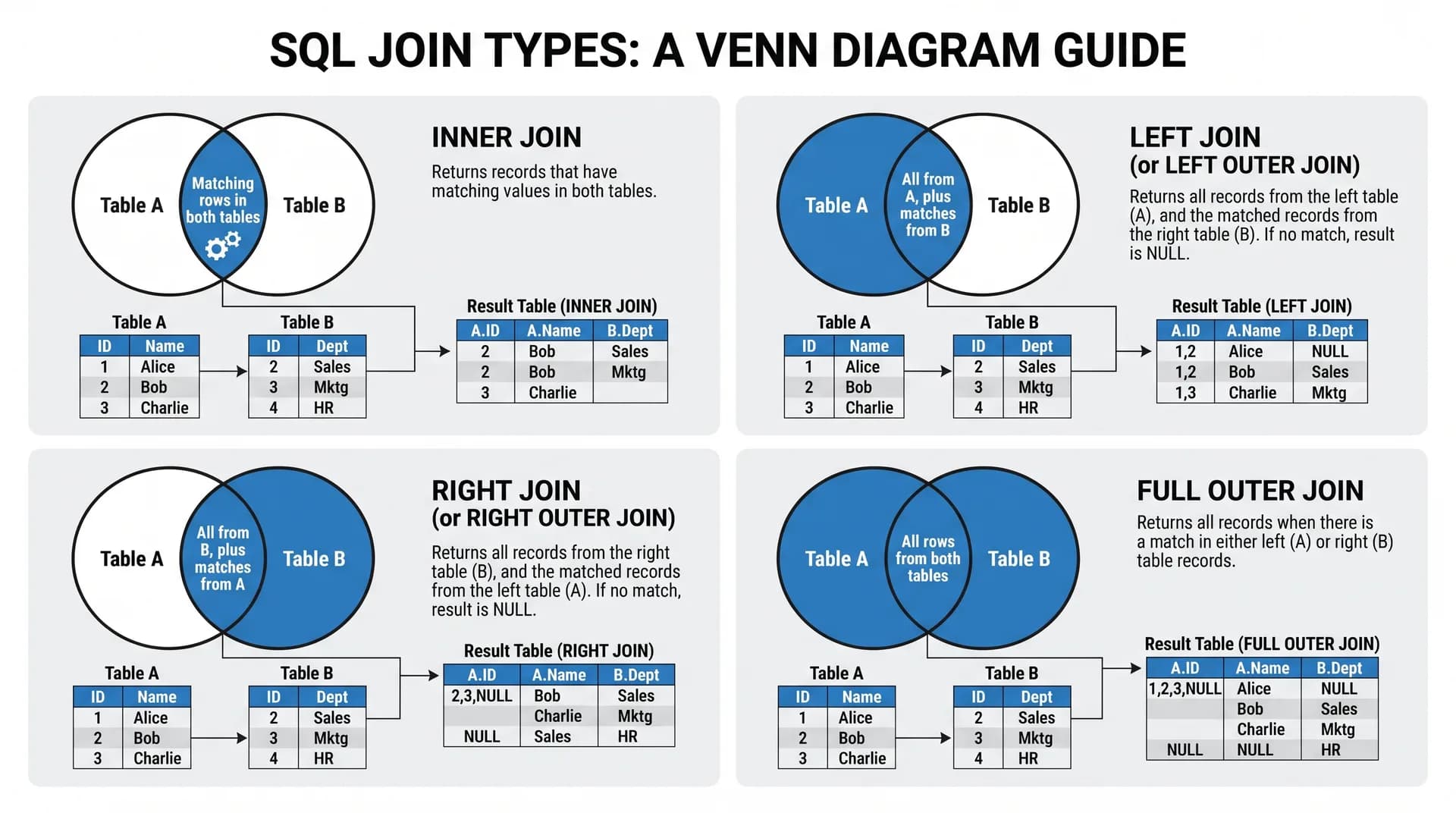
Imagine you have two tables:
Students Table
| student_id | name |
|---|---|
| 1 | John |
| 2 | Sarah |
| 3 | David |
Enrollments Table
| enrollment_id | student_id | course |
|---|---|---|
| 101 | 1 | Database Systems |
| 102 | 2 | Networking |
| 103 | 1 | Web Development |
You can use different types of JOINs to combine these tables:
INNER JOIN
Returns only records that have matching values in both tables:
SELECT students.name, enrollments.course
FROM students
INNER JOIN enrollments
ON students.student_id = enrollments.student_id;
LEFT JOIN
Returns all the records from the left table and any matching records from the right table. If there's no match, then the right table columns will return NULL:
SELECT students.name, enrollments.course
FROM students
LEFT JOIN enrollments
ON students.student_id = enrollments.student_id;
RIGHT JOIN
Returns all records from the right table and any matching records from the left table:
SELECT students.name, enrollments.course
FROM students
RIGHT JOIN enrollments
ON students.student_id = enrollments.student_id;
FULL OUTER JOIN
Returns all records when there is a match in either the left or the right table:
SELECT students.name, enrollments.course
FROM students
FULL OUTER JOIN enrollments
ON students.student_id = enrollments.student_id;
Note: Database support and syntax vary widely. MySQL, for example, doesn't have a native FULL OUTER JOIN operator.
Understanding JOINs is fundamental for any backend developer, data analyst, or database engineer, as relational applications will invariably spread data across multiple tables.
SQL Aggregate Functions
Aggregate functions perform a calculation on multiple rows and return a single value. They are very commonly used in reporting and analytics:
- COUNT(): Counts rows
- SUM(): Calculates the total value
- AVG(): Calculates the average value
- MIN(): Finds the minimum value
- MAX(): Finds the maximum value
For example, to count the total number of students:
SELECT COUNT(*)
FROM students;
To calculate the average student age:
SELECT AVG(age)
FROM students;
To find the oldest student:
SELECT MAX(age)
FROM students;
GROUP BY
The GROUP BY clause groups rows sharing a common value so aggregate functions can be applied to each group:
SELECT course, COUNT(*) AS total_students
FROM students
GROUP BY course;
This is how many students are enrolled in each course.
HAVING
The HAVING clause filters data after grouping:
SELECT course, COUNT(*) AS total_students
FROM students
GROUP BY course
HAVING COUNT(*) > 1;
This returns only courses with more than one student.
Key Difference: WHERE filters individual rows before grouping, whereas HAVING filters aggregated groups after grouping.
Updating and Deleting Records
SQL also includes statements to modify or delete existing data.
UPDATE
The UPDATE statement modifies existing records.
For example, to update John’s age:
UPDATE students
SET age = 22
WHERE student_id = 1;
The WHERE condition ensures that only the specified record is changed.
UPDATE without a WHERE clause modifies every single row in the entire table.DELETE
The DELETE statement removes records:
DELETE FROM students
WHERE student_id = 4;
This deletes the student record (ID 4).
WHERE clause in a DELETE statement erases every row from the table. Always test your WHERE predicate with a SELECT first before executing destructive queries in production.Primary Keys and Foreign Keys
Keys maintain relationships and enforce data integrity across relational tables.
Primary Key
A primary key uniquely identifies each row in a table:
CREATE TABLE departments (
    department_id INT PRIMARY KEY,
    department_name VARCHAR(100) NOT NULL
);
Here, department_id uniquely identifies each department and cannot contain NULL.
Foreign Key
A foreign key links rows in a child table back to a primary key in a parent table:
CREATE TABLE employees (
    employee_id INT PRIMARY KEY,
    employee_name VARCHAR(100) NOT NULL,
    department_id INT,
    FOREIGN KEY (department_id) REFERENCES departments(department_id)
);
This links employees to departments. Foreign key constraints maintain referential integrity by preventing orphaned or invalid references.
SQL Best Practices for Beginners
Learning SQL syntax is only the first step. Writing clean, efficient, and reliable queries is equally critical:
- Avoid unnecessary SELECT * statements: Retrieve only the columns your application requires.
- Always verify UPDATE and DELETE conditions: Double-check your WHERE filters before modifying data.
- Use meaningful names: Select descriptive, consistent names for tables and columns.
- Use primary and foreign keys: Enforce reliable structure and referential integrity.
- Understand indexes: Index key columns appropriately to boost query lookup speeds.
- Use transactions: Group related operations so they succeed or fail as a single atomic unit.
- Use parameterized queries: Never concatenate raw user input into SQL strings; this prevents SQL injection.
- Practice JOIN operations: Master combining data across related tables cleanly.
- Understand NULL behavior: NULL represents missing or unknown data, not zero or an empty string.
- Test queries before production: Validate query performance and accuracy in a staging environment.
What Is SQL Injection?
SQL injection is a serious security vulnerability that occurs when an application lets untrusted user input modify the structure of an SQL query.
Never build SQL statements by concatenating raw strings—an attacker can inject syntax like ' OR '1'='1 to bypass filters or drop tables. Always use parameterized prepared statements:
# UNSAFE — vulnerable to SQL injection
cursor.execute(f"SELECT * FROM students WHERE email = '{user_email}'")

# SAFE — parameterized query treats user input strictly as data
cursor.execute("SELECT * FROM students WHERE email = %s", (user_email,))How to Learn SQL Step by Step
The most effective way to learn SQL is through hands-on practice. Here is a recommended learning roadmap:
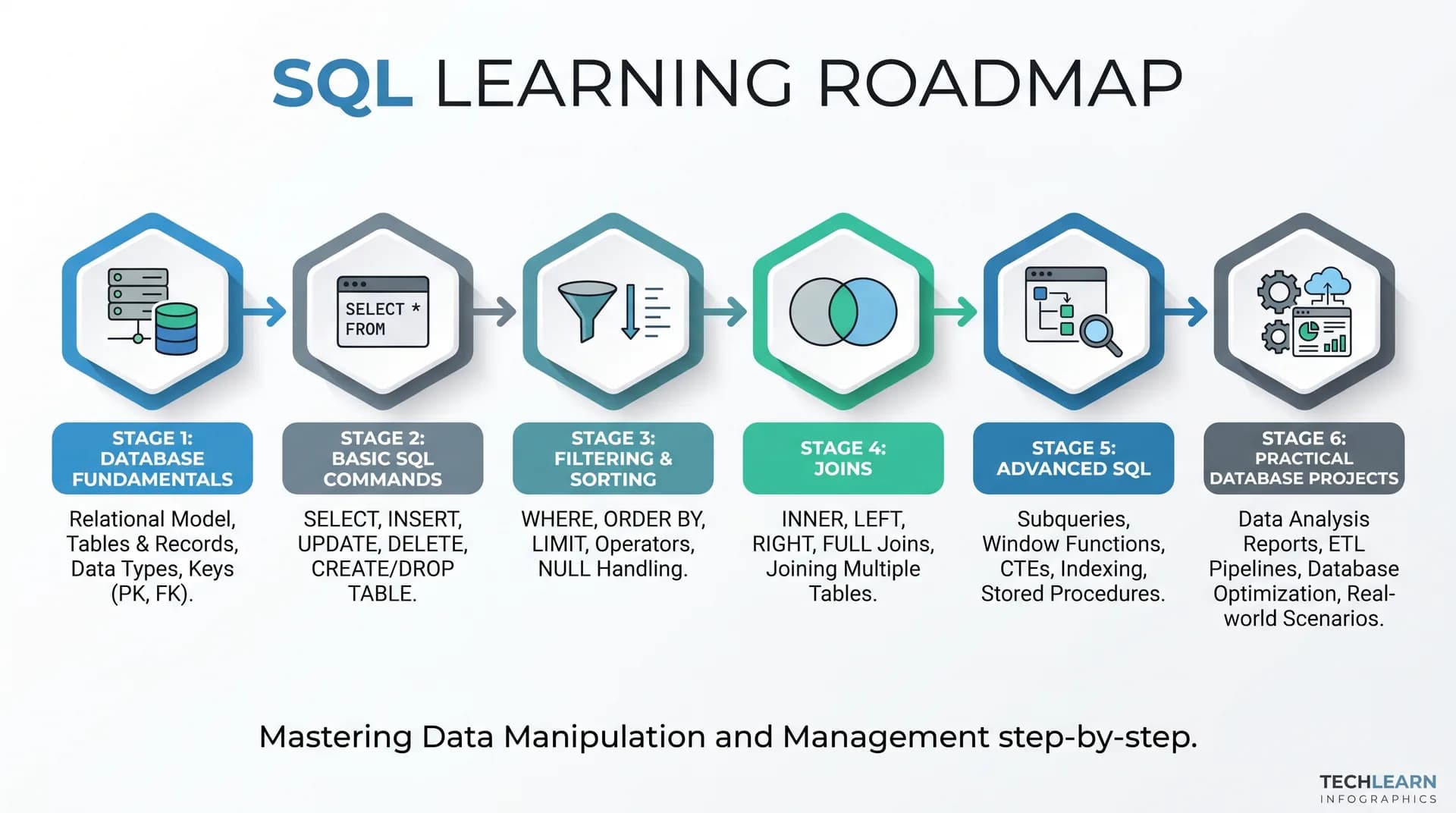
| Stage | Focus Topics | Skill Level |
|---|---|---|
| Stage 1: Database Fundamentals | Relational concepts, DBMS differences, tables, rows, columns, and keys. | Beginner |
| Stage 2: Basic SQL Commands | CREATE, INSERT, SELECT, UPDATE, DELETE , and DROP . | Beginner |
| Stage 3: Filtering and Sorting | WHERE, AND, OR, LIKE, BETWEEN, DISTINCT, ORDER BY , and LIMIT . | Beginner |
| Stage 4: Relationships and JOINs | INNER JOIN, LEFT JOIN, RIGHT JOIN , and foreign key constraints. | Intermediate |
| Stage 5: Advanced SQL Concepts | Subqueries, views, CTEs, window functions, indexing, and transactions. | Advanced |
| Stage 6: Build Practical Projects | Real-world applications (student registry, inventory database, e-commerce store). | Practical Experience |
Recommended Tools to Practice SQL
You do not need paid software or local installations to start practicing SQL. Recommended free platforms include:
- DB Fiddle: Run and share queries directly in your browser. Visit DB Fiddle.
- SQL Fiddle: Practice schema setup and query execution. Visit SQL Fiddle.
- PostgreSQL: Practice with a powerful, open-source database engine. Official Website.
- MySQL: Learn on one of the most widely deployed database engines in the world—official Documentation.
- SQLite: Experiment with a zero-configuration, lightweight relational database. Official Website.
Frequently Asked Questions (FAQs)
1. What is SQL in plain English?
SQL is the standard language for interacting with relational databases. You can use it to create the database structure, insert data, query data, update data, and delete data.
2. Is SQL easy for a beginner to learn?
Yes, SQL is considered pretty beginner-friendly because the syntax uses readable, English-like keywords (SELECT, FROM, WHERE, INSERT, etc.). Once you've got the basics down, then writing complex joins and optimizing queries is where you really start to need the experience.
3. What's the difference between SQL and a database?
A database is the container in which data is stored electronically. SQL is the language you use to query and manipulate the data within the database.
4. What are the five basic SQL commands?
Five basic commands: SELECT (to retrieve data), INSERT (to insert data), UPDATE (to update data), DELETE (to delete data), and CREATE (to create database objects).
5. What's the difference between MySQL and PostgreSQL?
MySQL and PostgreSQL are both open-source RDBMSs that support SQL. You'll most commonly find MySQL in general web development and content management systems. PostgreSQL is known for its strict adherence to the SQL standard and its advanced analytical capabilities.
6. Can I learn SQL without any prior programming experience?
Yes. SQL does not require prior programming experience in languages like Python or JavaScript. It is a declarative language focused on describing what data to retrieve rather than writing step-by-step application logic.
7. What is a SQL JOIN?
A SQL JOIN combines columns from one or more tables based on a related column. Common variants include INNER JOIN, LEFT JOIN, RIGHT JOIN, and FULL OUTER JOIN.
8. What is the difference between WHERE and HAVING?
WHERE filters individual rows before any grouping occurs, whereas HAVING filters aggregated groups created by a GROUP BY clause.
9. What is a primary key in SQL?
A primary key is a column or combination of columns that uniquely identifies every record in a table. Primary keys must contain unique values and cannot be NULL.
10. How long does it take to learn SQL?
Most beginners can understand basic queries and table structures within one to two weeks of consistent study. Mastering complex joins, window functions, and database performance optimization typically takes a few months of practical project experience.
Conclusion
SQL is one of the most durable and valuable skills in software development, data analytics, and database management. It provides a reliable, standard framework for organizing, querying, and manipulating relational data.
By understanding core database concepts, standard syntax, JOIN operations, and aggregate functions, you will have the foundation required to build real-world applications. Start practicing with simple queries today, experiment with different datasets, and gradually advance toward building complete database systems.
Test Your SQL & MySQL Query Skills
Put SELECT, filtering, JOIN logic, and schema design into practice with this interactive SQL quiz: