DevOps Explained Simply: A Beginner-Friendly Introduction
Contemporary software development is much faster than it was a decade ago. Companies release new features daily or several times a day. This speed is possible because of DevOps. If you've wondered what DevOps means or why everyone in tech talks about it, this guide is for you.
This guide will help you understand the fundamentals without confusing jargon. Whether you're a student, aspiring software engineer, IT specialist, or simply curious about software development, you'll learn how DevOps works, why it matters, and how organizations use it to build reliable software quickly.
What Is DevOps?
DevOps is a combination of two words:
- Development (Dev)
- Operations (Ops)
It is a culture, methodology, and set of practices that encourage developers and IT operations teams to work together throughout the entire software development lifecycle.
Instead of working in separate departments, everyone collaborates from planning to deployment and maintenance.
Simply put:
Simply put, DevOps helps teams build software faster, test it automatically, deploy it safely, and improve it continuously.
Think of DevOps like a restaurant.
- Chefs prepare meals.
- Servers deliver food.
- Managers guarantee everything runs smoothly.
If these groups never communicated, customers would face delays and mistakes. DevOps creates teamwork so software reaches users quickly and reliably.
Why Was DevOps Created?
Years ago, software development followed a traditional workflow.
Developers wrote code.
Once finished, they handed it to the operations teams.
Operations teams then tried deploying it to servers.
Unfortunately, problems often appeared:
- Software worked on developers' computers but not on production servers.
- Deployments required hours or even days.
- Bugs were discovered late.
- Customers waited months for updates.
Organizations needed a better approach.
DevOps emerged to solve these issues by promoting collaboration, automation, and feedback.
Today, many leading technology companies rely on DevOps to release updates quickly while preserving high quality.
Traditional Development vs DevOps
| Separate teams | Collaborative teams |
| Manual deployment | Automated deployment |
| Slow releases | Frequent releases |
| Limited testing | Continuous testing |
| Delayed feedback | Immediate feedback |
| Higher risk | Lower risk |
| Reactive maintenance | Proactive monitoring |
The biggest difference is communication.
Instead of passing work between departments, everyone shares responsibility, which is the biggest difference.
Core Principles of DevOps
1. Collaboration
DevOps breaks down barriers between developers, testers, security engineers, and operations professionals.
Everyone works toward the same goal:
Deliver valuable software to customers.
Regular communication reduces misunderstandings and speeds up problem-solving.
2. Automation
Automation is one of DevOps' greatest strengths.
Instead of repeating manual tasks, computers manage repetitive work.
Examples include:
- Running tests
- Building applications
- Deploying updates
- Monitoring servers
- Creating infrastructure
- Performing backups
Automation reduces human error while saving significant time.
3. Continuous Integration (CI)
Programmers frequently merge code into the shared repository.
Every change automatically triggers:
- Compilation
- Testing
- Code quality checks
This helps identify faults early before they turn expensive to fix.
4. Continuous Delivery (CD)
After successful testing, the software is automatically prepared for release.
Teams can deploy updates whenever they want with minimal manual effort.
Some organizations even release software several times every day.
5. Persistent Monitoring
Software doesn't stop after deployment.
Applications must be monitored to make sure they remain healthy.
Monitoring tools track:
- CPU usage
- Memory consumption
- Response times
- User activity
- Error rates
- Security events
If problems occur, teams receive alerts immediately.
Understanding the DevOps Lifecycle
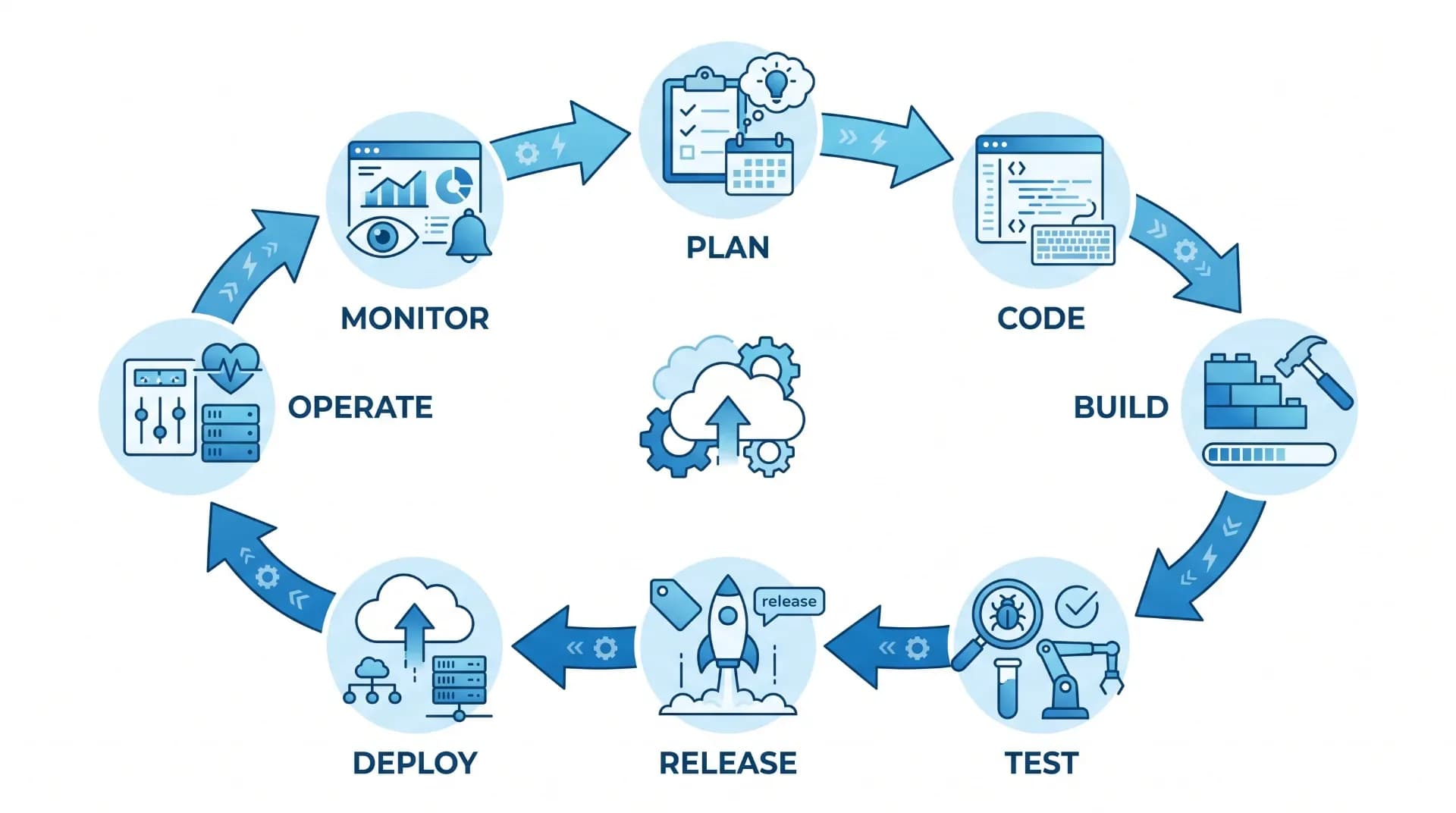
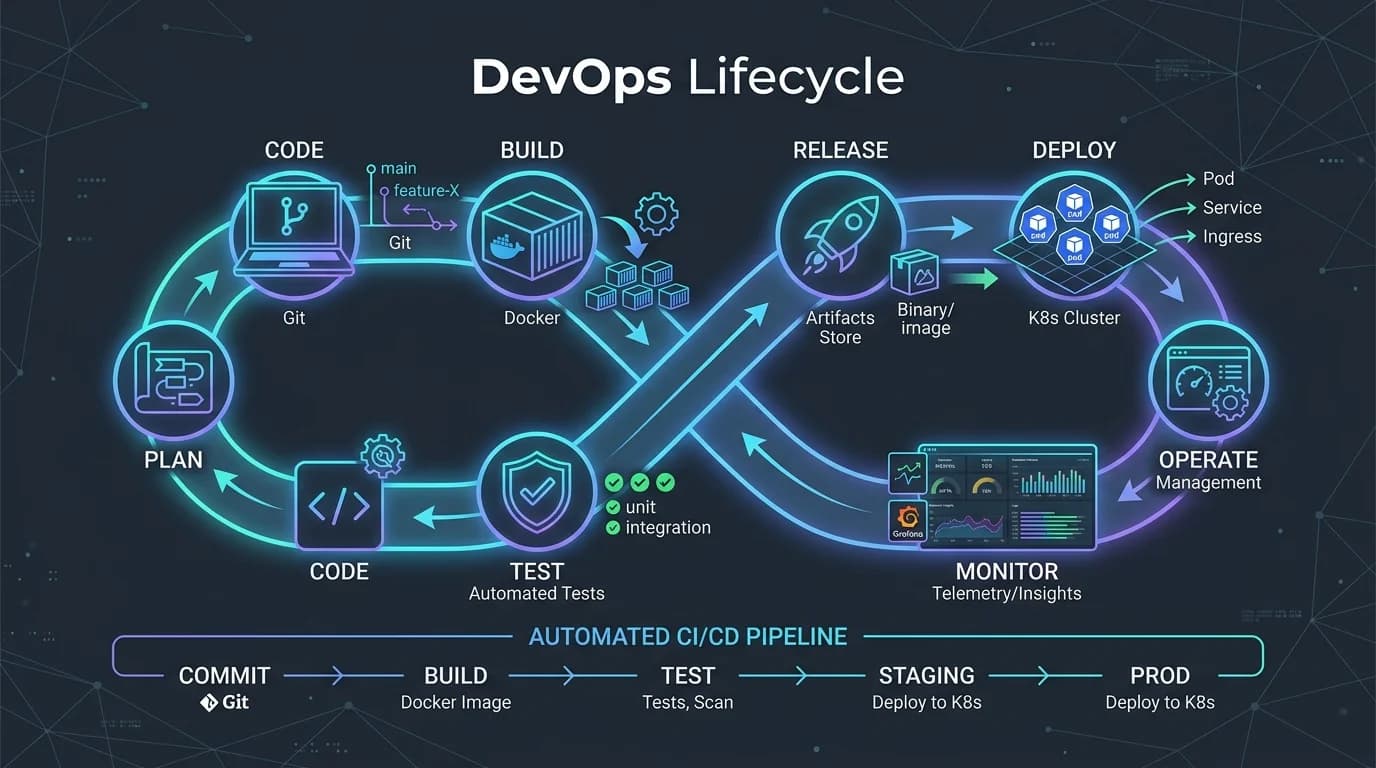
DevOps follows a repetitive cycle, not a straight line. Each stage feeds into the next, and feedback loops back into the cycle.
Planning
Every project starts with planning.
Teams gather requirements, define goals, rank tasks, and plan development roadmaps.
Popular planning tools include Jira, Azure Boards, and Trello.
Development
Developers write application code using programming languages such as:
- Python
- Java
- JavaScript
- C#
- Go
Version control systems like Git help track every change.
Building
Once developers commit code, automated systems compile it into an application, moving the work toward the next stage.
Building servers guarantees everything compiles successfully before moving to the next stage.
Testing
Automated testing verifies that the application functions correctly.
Common test types include:
- Unit testing
- Integration testing
- Functional testing
- Performance testing
- Security testing
Finding bugs early conserves time and cuts costs.
Deployment
After passing all quality checks, the application is deployed, moving it from testing into release.
Modern DevOps teams often use automated delivery pipelines to release software consistently across development, test, and production environments.
This automation limits downtime and reduces the risk of deployment errors.
Popular DevOps Tools
DevOps relies on many tools that automate tasks, improve collaboration, and streamline software delivery. No single tool is mandatory, but understanding common ones helps beginners see how DevOps workflows come together.
| Git | Version control |
| GitHub / GitLab / Bitbucket | Code hosting and collaboration |
| Jenkins | Continuous Integration and Continuous Delivery (CI/CD) |
| Docker | Containerization |
| Kubernetes | Container orchestration |
| Terraform | Infrastructure as Code (IaC) |
| Ansible | Configuration management and automation |
| Prometheus | Monitoring and alerting |
| Grafana | Data visualization and dashboards |
Each tool plays a specific role, but together they create a reliable and automated software delivery pipeline.
CI/CD Explained
One of the most important concepts in this guide is CI/CD.
What Is Continuous Integration (CI)?
Continuous Integration is the practice of frequently merging code changes into a shared repository. Each time a contributor submits new code, automated processes start immediately.
These automated tasks often include:
- Building the application
- Running automated tests
- Checking code quality
- Detecting security issues
Because changes are integrated, bugs are identified early. Continuous Delivery ensures that software is always ready to be deployed.
Instead of waiting weeks or months for a release, teams can confidently publish updates whenever needed.
Continuous Deployment
Some organizations take automation one step further with Continuous Deployment.
In this model:
- Code passes all tests.
- Approval checks are completed.
- The application is automatically released to users.
This approach enables companies to deliver improvements multiple times a day while maintaining reliability.
Infrastructure as Code (IaC)
Traditionally, system administrators configured servers manually. This was time-consuming and prone to human error.
Infrastructure as Code (IaC) changes this by defining infrastructure through code files.
Instead of clicking through setup screens, engineers write configuration files that describe:
- Servers
- Networks
- Databases
- Storage
- Security settings
Popular IaC tools include Terraform and AWS CloudFormation.
Benefits of IaC
- Consistent environments
- Faster deployments
- Easier disaster recovery
- Better version control
- Improved scalability
Since infrastructure is treated like software, teams can review, test, and improve it as they do application code.
Cloud Computing and DevOps
Cloud computing and DevOps complement each other exceptionally well.
Cloud providers offer resources that can be created or removed in minutes, making automation more effective.
Popular cloud platforms include:
- Amazon Web Services (AWS)
- Microsoft Azure
- Google Cloud Platform (GCP)
Using cloud services allows DevOps teams to:
- Launch servers quickly
- Scale applications automatically
- Store backups securely
- Monitor systems efficiently
- Reduce infrastructure costs
Cloud platforms integrate with many DevOps tools, simplifying the development lifecycle.
Benefits of DevOps
Organizations across industries adopt DevOps because it offers significant advantages.
1. Faster Software Releases
Automation eliminates many repetitive tasks, allowing teams to release updates more frequently.
2. Better Software Quality
Continuous testing catches defects early, reducing the likelihood of bugs reaching customers.
3. Improved Collaboration
Developers, testers, operations engineers, and security professionals work together throughout the project.
4. Greater Reliability
Automated deployments reduce configuration errors and improve consistency across environments.
5. Increased Customer Satisfaction
Frequent updates allow businesses to respond quickly to customer feedback and changing market needs.
6. Lower Operational Costs
Automation saves time and reduces effort needed to manage infrastructure manually.
7. Enhanced Security
Modern DevOps often incorporates security practices into every stage of development, an approach known as DevSecOps.
Challenges Beginners Should Know
Although DevOps provides many advantages, adopting it isn't always easy.
Cultural Change
Organizations must encourage collaboration between teams that may have traditionally worked independently.
Learning New Tools
Beginners often encounter many technologies at once, including Git, Docker, Kubernetes, Jenkins, and Terraform. Learning them gradually is more effective than trying to master everything at once.
Automation Complexity
Designing reliable automation pipelines requires careful planning and testing.
Security Considerations
Automated systems must follow strong security practices, including access controls, encryption, and regular updates.
Monitoring Large Systems
As applications grow, monitoring becomes increasingly important for detecting issues before they affect users.
DevOps Best Practices
If you're starting your DevOps journey, consider these proven practices:
- Embrace collaboration across teams.
- Automate repetitive tasks whenever possible.
- Use version control for both application code and infrastructure.
- Implement automated testing in every project.
- Monitor applications continuously.
- Document processes clearly.
- Review deployments regularly to identify areas for improvement.
- Prioritize security from the beginning rather than adding it later.
Following these practices helps build a strong foundation for successful DevOps adoption.
DevOps Career Opportunities
The demand for DevOps professionals continues to grow as organizations accelerate digital transformation.
Common job roles include:
| DevOps Engineer | Automates software delivery pipelines |
| Site Reliability Engineer (SRE) | Ensures system reliability and performance |
| Cloud Engineer | Manages cloud infrastructure |
| Platform Engineer | Builds and maintains developer platforms |
| Automation Engineer | Creates automation scripts and workflows |
| Release Engineer | Oversees software releases |
| Infrastructure Engineer | Designs and maintains IT infrastructure |
Essential Skills for Beginners
To build a career in DevOps, focus on developing skills in:
- Linux fundamentals
- Networking basics
- Git and version control
- Scripting (Bash or Python)
- Cloud platforms
- Docker
- Kubernetes
- CI/CD pipelines
- Infrastructure as Code
- Monitoring and logging
- Problem-solving and communication
Remember that DevOps is as much about collaboration and continuous learning as about technical expertise.
Frequently Asked Questions (FAQs)
1. Is DevOps only for programmers?
No. While developers play a major role, DevOps also involves system administrators, testers, cloud engineers, security professionals, and operations teams.
2. Do I need coding skills to learn DevOps?
Basic coding or scripting knowledge is helpful, especially in languages like Bash or Python. However, beginners can start by understanding DevOps concepts before diving into programming.
3. What is the difference between Agile and DevOps?
Agile focuses on improving the software development process through iterative work and continuous development. Through cyclicalevOps, it extends these principles by integrating development and operations to automate software delivery and maintenance.
4. Is Docker the same as DevOps?
No. Docker is a containerization tool commonly used in DevOps environments, but DevOps itself is a broader culture and set of practices.
5. How long does it take to learn DevOps?
The timeline depends on your background. Someone with software development or system administration experience may learn the basics in a few months, while mastering advanced tools and practices takes longer.
6. Is DevOps a good career choice?
Yes. DevOps professionals are in high demand across industries, and the field offers strong opportunities for career growth, competitive salaries, and continuous learning.
Conclusion
This DevOps Explained Simply: A Beginner-Friendly Introduction has explored the fundamentals of one of the most influential approaches in modern software development. DevOps is more than a collection of tools; it is a culture that encourages collaboration, automation, continuous improvement, and shared responsibility. By adopting practices such as Continuous Integration, Continuous Delivery, Infrastructure as Code, and proactive monitoring, organizations can deliver software faster, improve quality, and respond more effectively to customer needs.
For beginners, the key is to build a strong foundation. Start with version control using Git, learn Linux basics and scripting, explore containers with Docker, and gradually move into cloud platforms, CI/CD pipelines, and Kubernetes. Remember that becoming proficient in DevOps is a journey of continuous learning and practice, and if you're aiming for a career in software engineering, cloud computing, or IT operations, understanding DevOps will equip you with valuable skills that are increasingly essential in today's technology landscape.
Further Reading: The official documentation for the DevOps practices and tools you choose is an excellent resource for deepening your knowledge. For example, Microsoft's DevOps guidance is available at: https://learn.microsoft.com/devops
By embracing collaboration, automation, and a mindset of continuous improvement, you'll be well on your way to understanding—and applying—the principles that power today's most successful software teams.